
How to Write Off Invoice Balances in Abtrac
If you use the optional Debtor Management module in Abtrac, invoice payments and outstanding accounts can be managed separately from your accounting system. When combined with the Abtrac Accounts link, customer payments can sync automatically from systems such as Xero — however only actual payment transactions sync automatically.
Other debtor adjustments, including Bad Debts, Uneconomic Amounts Written Off, discounts, credits, and journal adjustments, need to be recorded manually in Abtrac so your debtor balances match your accounting records.
This article explains how to write off invoice balances in Abtrac using debtor payment events. This is different from writing off time before invoicing, adjusting WIP values, or creating zero-value invoices to clear unbilled time.
Before you begin
There are several different types of “write-offs” in Abtrac, and they are used for different purposes.
This article relates specifically to writing off outstanding invoice balances in the Debtors Module after an invoice has already been issued.
It does not cover:
- Creating zero-value invoices to clear WIP
- Writing off time when invoicing
- WIP adjustments and write-ons/write-offs
- Credit Notes or Adjustment Invoices used to reverse invoiced fees
How to write off an invoice balance
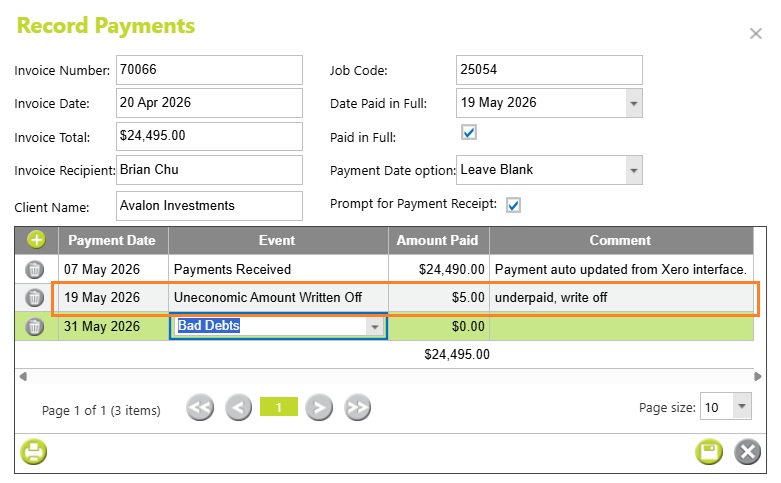
From the Debtors Module > Invoices and Payments page > select the option to record a payment.
- Enter the payment date and amount.
- Choose the appropriate Payment Event Type:
- Bad Debts
- Uneconomic Amount Written Off
- Save the transaction.
The invoice balance will then be reduced or cleared depending on the amount entered.
Read more about recording invoice payments and payment event types here
Payment event types used for write-offs
When manually recording payments in the Debtors Module, there are several payment event types available. The two most commonly used for invoice write-offs are:
Bad Debts
Bad Debts are generally used where an invoice balance is no longer expected to be collected.
Examples may include:
- A client has gone out of business
- Collection attempts have failed
- An outstanding balance has been formally written off
Recording a Bad Debt payment event reduces the outstanding debtor balance while allowing the transaction to be separately identified in debtor reports.
Uneconomic Amount Written Off
Uneconomic Amount Written Off is typically used for very small balances that are not worth pursuing further.
Common examples include:
- Minor underpayments
- Rounding differences
- Small residual balances left after final payment
For example, if a client underpays an invoice by a few cents or dollars, it is often easier to write off the remaining balance than continue debtor follow-up.
Reporting on written-off invoices
Write-off payment events are included separately in debtor reporting so they can be reviewed independently from actual customer payments.
Relevant reports include:
- Receipt Schedule Report
- Bad Debts Written Off Report
- Aged Debtors reports
- Debtor transaction history
These reports can help reconcile debtor balances between Abtrac and your accounting system.
Depending on how your business is set up, these write-off types may also line up with different accounting codes or categories in your accounting system, such as bad debts or write-off expense accounts.
Credit Notes and Adjustment Invoices
If an invoice itself needs to be reversed or corrected, you may instead need to use a Credit Note or Adjustment Invoice rather than a debtor write-off payment event.
Generally:
- Use a debtor write-off when reducing or clearing an outstanding balance
- Use a Credit Note or Adjustment Invoice when changing the actual invoiced value
Read the article on Credit Notes and Adjustment Invoices
Abtrac KB# 2119