
The Bad Debts Written Off report lists invoices from a selected period that have had amounts written off. This includes invoices where balances have been cleared using either the Bad Debts or Uneconomic Amount Written Off payment event types in the Debtors Module > Invoice Payments page.
This report is useful for reviewing debtor write-offs, identifying unrecoverable invoices, and tracking small balances that have been cleared from Accounts Receivable. It’s companion report is the Receipt schedule, which shows similar data but is instead filtered by payment date – not invoice date.
The Bad Debts Written Off report is only available with Abtrac’s Debtor Management module, and is also called the Invoice Amounts Written Off report.
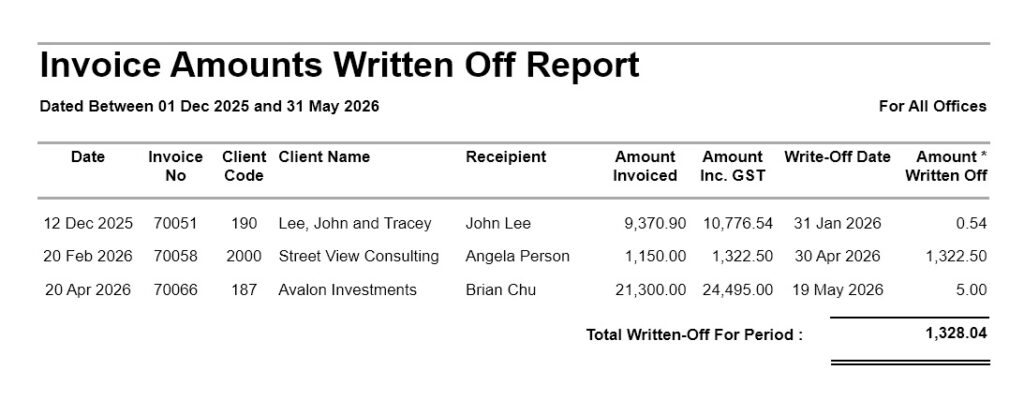
Bad Debts Written Off Report
Go to Debtor Management >> Debtor Reports >> click on ‘Bad Debts Written Off ’ and select the required date range. These dates relate to invoice dates, and not invoice payment event dates.
Bad Debts Written Off Report – Filter, Sort and Grouping Options
You can also optionally filter this report by Invoice Office.
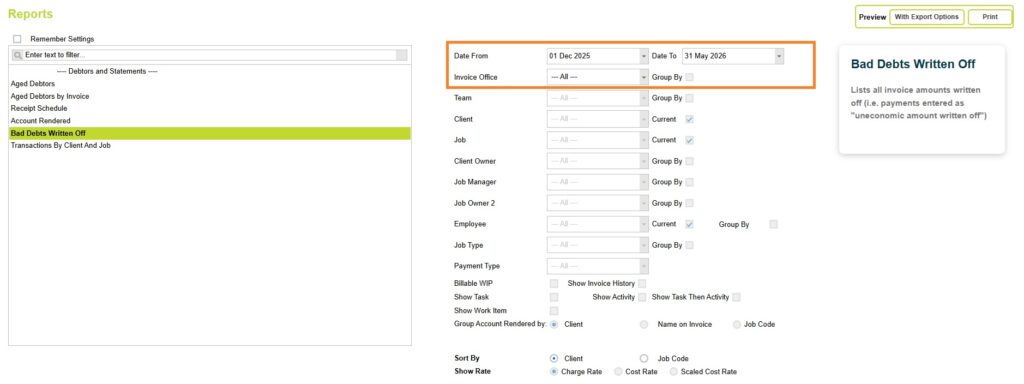
Click on the preview button to preview the Bad Debts Written Off report.
Understanding the data
The report displays invoices based on their original invoice date, along with details of any amounts later written off.
Information shown in the report includes:
- Date (Invoice Date)
- Invoice No (Invoice Number)
- Client Code
- Client Name
- Recipient
- Amount Invoiced
- Amount inc GST
- Write-Off Date
- Amount Written Off
A total written-off amount for the selected period is also shown at the bottom of the report.
Which write-offs are included
The report only includes invoices where one of the following payment event types has been used:
- Bad Debts
- Uneconomic Amount Written Off
These payment event types are recorded manually in the Debtors Module from Invoices and Payments > Record Payments when clearing invoice balances that will not be collected in full.
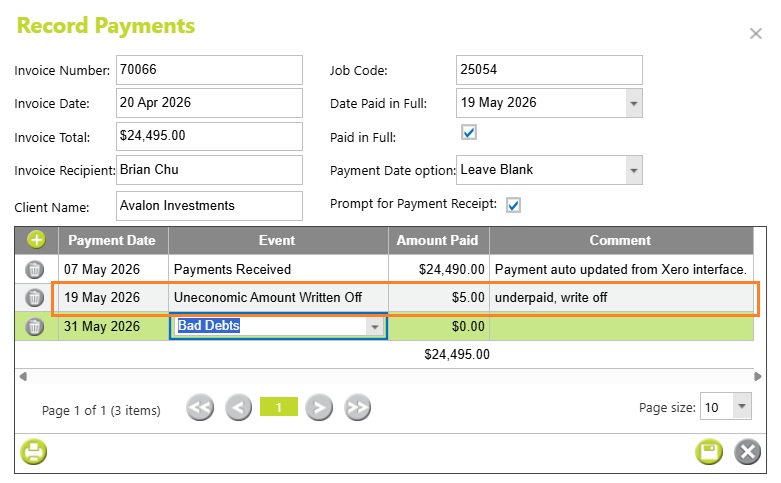
Date
This is the Invoice Date from Invoices > Invoice Details. The report is filtered using the original invoice date, not the write-off date.
For example, an invoice raised in December may still appear in the report even if the write-off itself occurred several months later.
The Write-Off Date column shows when the Bad Debt or Uneconomic Amount Written Off event was recorded against the invoice.
Write Off Date
This is the Payment Date from Invoices and Payments > Record Payments.
Amount Written Off
The amount paid (including tax) for a payment line from Invoices and Payments > Record Payments.
Abtrac KB # 2253