
The Transactions by Client and Job Report provides a detailed transaction history for invoices raised against a specific client and job. It shows invoice amounts, payments received, discounts, credit notes, journal adjustments, and the running balance outstanding for each invoice.
This report is particularly useful when investigating debtor balances, reviewing payment histories, reconciling client accounts, or answering client queries about outstanding invoices.
Unlike many other debtor reports, this report displays the complete transaction history associated with each invoice, allowing you to see exactly how the current balance has been calculated.

Transactions by Client and Job Report
Go to Debtor Management >> Debtor Reports >> click on ‘Transactions by Client and Job’.
Transactions by Client and Job Report – Filter, Sort and Grouping Options
You can also optionally filter this report by Invoice Office, Client and Job, and group by Invoice Office.
If no filters are applied, the report may return every invoice and transaction recorded in your database, which can result in a very large report and make it difficult to locate the information you need.

Click on the preview button to preview the Transactions by Client and Job report.
Understanding the data
For each transaction, the report can display:
- Invoice number
- Client name and code
- Job code
- Name on invoice
- Payment date
- Payment comments or notes
- Amount invoiced
- Amount paid
The report also includes subtotals for each section, grouped by payment type and an overall report total.
The Transactions by Client and Job report is grouped by Client and Job, and then by invoices. It displays totals by Client, and a grand total for the report overall.
For each job the report displays:
- Date (Invoice Date or Payment Date)
- Invoice No.
- Event (Payment Event)
- Amount Inc GST
- Payment Received
- Balance
Date
This is either the Invoice Date, or the Payment Date from Invoices and Payments > Record Payments.
Payment Events
There are five payment event types to choose from when recording payments manually in the Debtors Module: Payments Received, Uneconomic Amount Written Off, Bad Debts, Journal Adjustment and Discount Given. These options are then used in debtor reporting.
Each payment event type is used for a different kind of debtor transaction, allowing you to accurately track in your Receipts schedule report how an invoice balance was settled and report on those transactions separately. Depending on how your business is set up, these payment event types may also line up with different accounting codes or categories in your accounting system, such as bad debts, discounts, or adjustment journals.
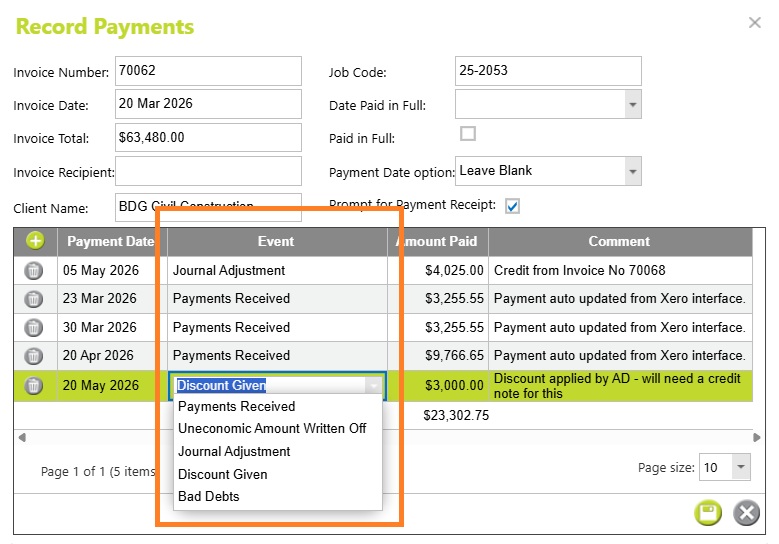
Payments Received
Payments Received are standard customer payments made against an invoice. These reduce the outstanding debtor balance and are typically used for normal cash receipts, EFT payments, or payments synced from accounting systems such as Xero.
Uneconomic Amount Written Off
Uneconomic Amount Written Off is used for very small outstanding balances that are not worth chasing, such as minor underpayments or rounding differences. This clears the invoice balance without requiring a formal credit note.
Bad Debts
Bad Debts are used when an outstanding invoice is considered unrecoverable and needs to be written off entirely or partially. This is commonly used for overdue invoices that will no longer be pursued for payment.
Journal Adjustment
Journal Adjustment is used for accounting-style adjustments between invoices or debtor balances, often involving credit notes, reallocations, or corrections. These entries commonly offset each other and may not represent actual cash received.
Discount Given
Discount Given is used when part of an invoice is waived as a negotiated or operational discount rather than through a formal credit note. This might include settlement discounts, goodwill reductions, or agreed reductions at the time payment is received.
Amount Incl GST
The amount invoiced is the total value of invoices (including tax) with a payment event recorded for the selected dates.
This includes committed and uncommitted invoices. The figures here will correlate to those in an Invoice Listing report,
Payments Received
The amount paid (including tax) for a payment line from Invoices and Payments > Record Payments.
Balance
The remaining outstanding balance after the transaction/payment event for that date has been applied. The total balance reported for the client or job will reconcile to data with the equivalent filters for the Still Owing (Overpaid) amount on the Invoices and Payments page, and the Balance amount on the Debtor Control page.
Abtrac KB # 2258