
The Employee Productivity Report provides a summary of productive and non-productive time recorded by each employee during the selected reporting period.
The report summarises each employee’s recorded hours for the selected period, showing the split between chargeable and non-chargeable (billable and non-billable) time.
It also calculates productivity using three different measures, allowing you to compare chargeable hours against total recorded hours, At Work hours, and each employee’s standard required hours for the selected period.
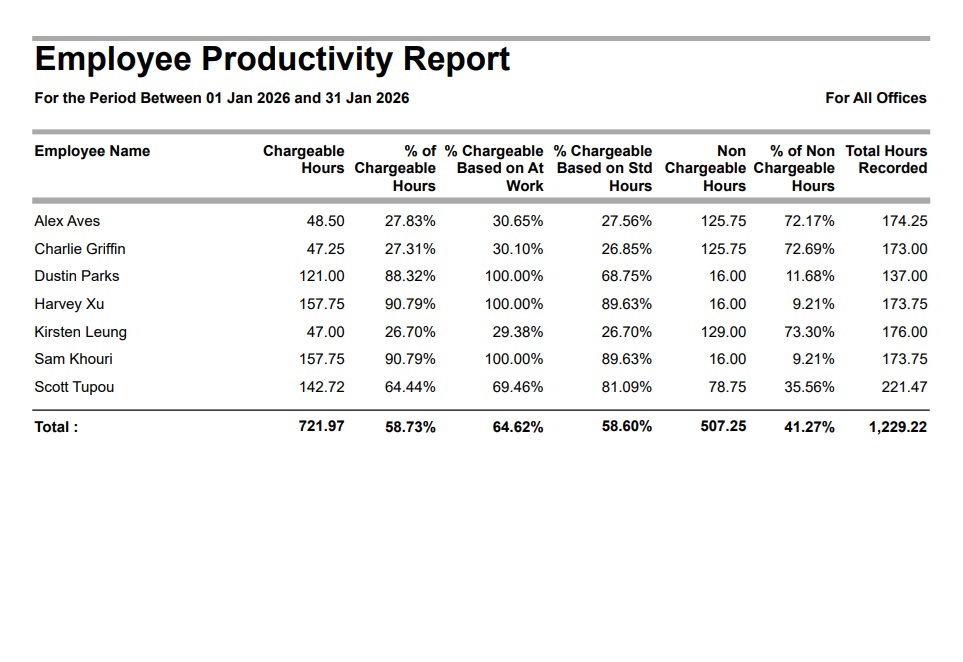
Employee Productivity Report
The Employee Productivity Report provides a summary of productive and non-productive time recorded by each employee during the selected reporting period.
Go to Reports > Performance Reports > from the ‘Management Analysis’ section, click on ”Employee Productivity’
Select the required date range.
Employee Productivity Report – Filter, Sort and Grouping Options
You can also optionally filter this report by Employee Office, and Team (Job Team or Employee Team), and group by Employee Team.
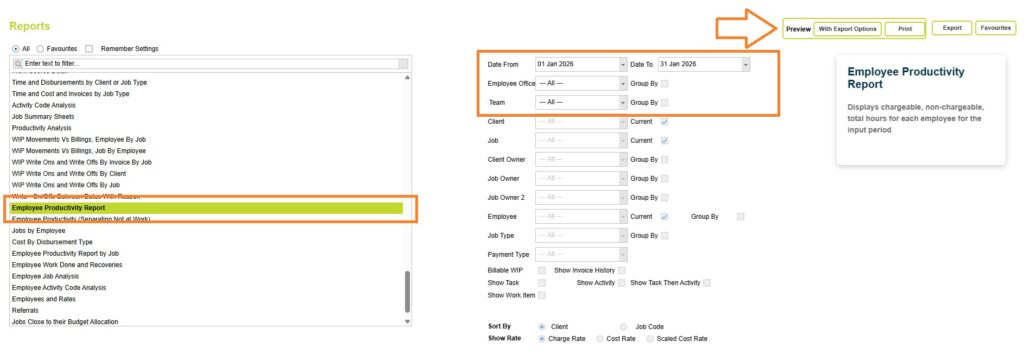
Now click on the Preview button and select one of the preview options (Print or with Export options).
Before generating the report, you can also select the following options:
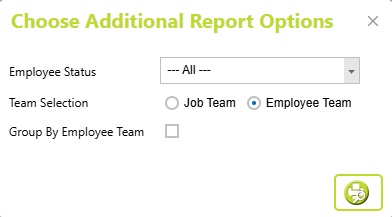
- Employee Status: Filter the report by employee status, for example to review productivity for Full Time employees only.
- Team Filter: Choose whether the Team filter applies to Employee Team or Job Team.
- Group by Employee Team: When Employee Team is selected, you can also choose to group the report by Employee Team.
Click on the preview button to preview the Employee Productivity report.
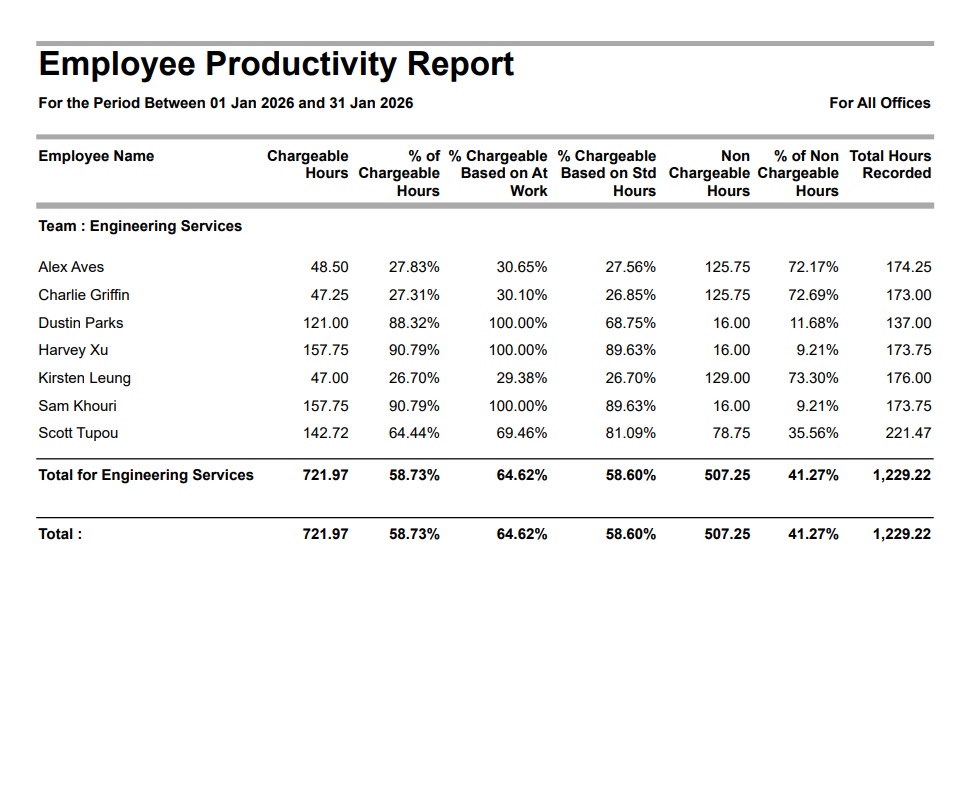
Understanding the data
The Employee Productivity Report provides an overall view of employee productivity across the selected reporting period.
It shows for each Employee:
- Chargeable Hours.
- % of Chargeable Hours.
- % Chargeable Based on At Work.
- % Chargeable Based on Standard Hours.
- Non Chargeable Hours.
- % of Non Chargeable Hours.
- Total Hours Recorded.
At the end of the report, an overall total is displayed for all employees included in the report. When Grouping by Employee Teams subtotal values are also displayed by Employee Team.
Date
The Employee Productivity Report is based on timesheet line dates and timesheet period ending dates.
To ensure Standard Hours are calculated correctly, it is recommended that you run the report using the same date range as your timesheet periods, unless your employees are configured with daily required units.
For example, if your employees complete weekly timesheets (ending on a Sunday) and required units are only defined for the timesheet period rather than each day, running the report for a calendar month (such as 1 April to 30 April) may produce unexpected Standard Hours. This is because required units are not pro-rated for partial timesheet periods that fall at the beginning or end of the reporting period.
For the most accurate Standard Hours calculations, select a reporting period that aligns with complete timesheet periods, or configure employees with daily required units.
Read more about Required timesheet units for employees here
Chargeable Hours
The total number of chargeable (billable) hours recorded by the employee during the selected reporting period.
These are hours entered against projects marked as billable.
Non Chargeable Hours
The total number of non-chargeable hours recorded by the employee during the reporting period. These are hours entered against project marked as not billable.
These typically include:
- Internal administration
- Meetings
- Training
- Proposal work
- Leave or other non-billable activities
The exact breakdown depends on how your organisation has configured projects within Abtrac.
Total Hours Recorded
The total number of hours recorded by the employee during the reporting period.
This includes both chargeable and non-chargeable time. You can review the billable or non-billable status for all hours recorded from the Bulk View Timesheets report, when grouping by the Billable column.
% of Non Chargeable Hours
Shows the percentage of the employee’s recorded time that was entered against non-billable projects.
This is calculated as:
% of Non Chargeable Hours =
Non Chargeable Hours ÷ Total Hours Recorded × 100
Together, the Chargeable and Non Chargeable percentages will normally total 100%.
% of Chargeable Hours
Shows the percentage of the employee’s recorded time that was entered against projects marked as billable.
This is calculated as:
% of Chargeable Hours =
Chargeable Hours ÷ Total Hours Recorded × 100
This percentage includes all recorded time, including leave, administration and other non-chargeable time.
% Chargeable Based on At Work
Shows employee productivity based only on time classified as At Work.
The calculation excludes time entered against jobs that have been marked as Not At Work, such as annual leave, public holidays or other approved absences. This often provides a more accurate measure of productive time because it focuses only on the time an employee was actually available for work.
The calculation is:
% of Chargeable Based when At Work =
Chargeable Hours ÷ At Work Hours × 100
Read more about the At Work/Not At Work classification here
% Chargeable Based on Standard Hours
Shows how much chargeable work was completed relative to the employee’s standard hours (required timesheet units).
The calculation is:
% Chargeable Based on Standard Hours =
Chargeable Hours ÷ Standard Hours × 100
Because this calculation compares chargeable hours against a fixed target, the percentage may be higher or lower than % of Chargeable Hours, depending on whether the employee worked more or fewer hours than their Standard Hours.
Standard Hours Productivity (Overtime)
If an employee records more than their Standard Hours, their % Chargeable Based on Standard Hours may exceed 100%, provided the additional hours are chargeable.
This allows you to see when an employee has delivered more chargeable work than their expected working hours for the reporting period.
Standard Hours Productivity (Undertime)
If an employee records fewer than their Standard Hours, their % Chargeable Based on Standard Hours will generally be lower than their % of Chargeable Hours.
This is because the calculation measures chargeable work against the employee’s expected working hours, rather than the hours they actually recorded.
To ensure Standard Hours are calculated correctly, it is recommended that you run the report using the same date range as your timesheet periods, unless your employees are configured with daily required units.
View examples of Productivity based on At Work Hours, Standard Hours or Total hours here
Which Productivity percentage is best for measuring chargeable time?
This really depends on what you are trying to answer.
There isn’t a single “correct” productivity percentage. Each metric answers a different question.
Operational utilisation – % Chargeable Based on At Work
% Chargeable Based on At Work is often the most meaningful measure of utilisation. It answers, “When employees were available to work, how much of that time was chargeable?” Because it excludes leave, public holidays and other Not At Work time, it provides a clearer picture of how available time was used.
Performance against expected capacity – % Chargeable Based on Standard Hours
% Chargeable Based on Standard Hours compares chargeable work against each employee’s expected working hours. It is useful for tracking utilisation targets and comparing productivity against standard capacity. Because Standard Hours are fixed, the percentage may exceed 100% when employees record additional chargeable hours, or be lower when they work fewer than their expected hours.
Allocation of recorded time – % of Chargeable Hours
% of Chargeable Hours shows how employees allocated the hours they actually recorded. It is useful for understanding the mix of chargeable and non-chargeable work, but should be interpreted alongside the other measures, as overtime and undertime can influence the result.
| Percentage | Best used when you want to know… | Notes |
|---|---|---|
| % of Chargeable Hours | “Of all the hours this employee recorded, how many were chargeable?” | Good for understanding how employees spent the time they actually recorded. Overtime and under-time both affect this percentage. |
| % Chargeable Based on At Work | “When the employee was actually at work, how much of that time was chargeable?” | Often the best measure of utilisation because it excludes leave, public holidays and other Not At Work time. |
| % Chargeable Based on Standard Hours | “How much of the employee’s expected working time was spent on chargeable work?” | Best for measuring performance against expected working hours. Chargeable overtime can increase this percentage above 100%, while working fewer than the employee’s Standard Hours will generally reduce it. |
Abtrac KB # 2269