
The Fees Earned by Referee and Job report shows the fees earned from work completed on jobs that have a Referred From source recorded.
The report groups jobs by the person or organisation that referred the work and shows the fees earned for each job. This can be used to review the value of work received through referrals and identify which referral sources have generated fees for your business.
The report can also include Referred From comments, allowing you to record and review additional information about how the referral was received.
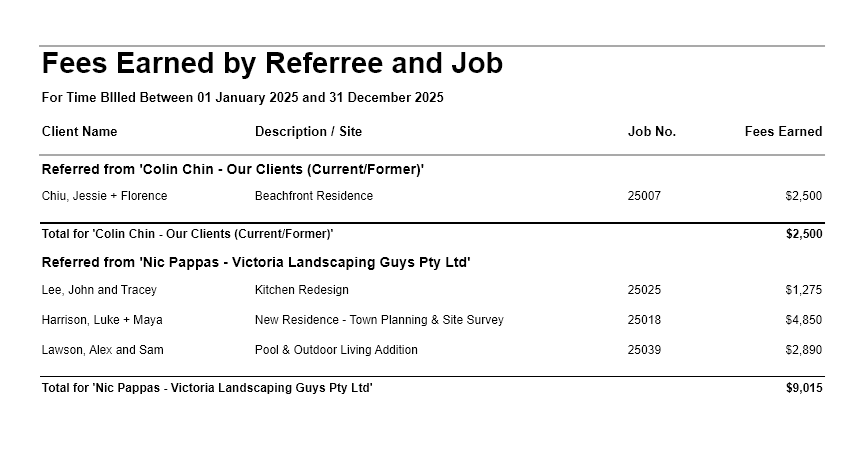
Fees Earned by Referee and Job Report
The Fees Earned by Referee and Job report is useful for reviewing the fees earned from jobs referred by each referral source. It shows the jobs and associated fees billed during the selected period, grouped by the person or organisation recorded as the Referred From source.
Go to Reports > Management Analysis > and choose Fees Earned by Referee and Job report.
Select the required date range to for time (and disbursements) that have been billed within the selected period.
Unlike the Referrals report, which is based on the job creation date, this report is based on fees from timesheet lines that have been assigned to invoices. A job can therefore appear in the Referrals report without appearing in the Fees Earned report if there are no relevant invoiced timesheet lines yet.
Fees Earned by Referee and Job Report – Filter, Sorting and Grouping Options
You can also optionally filter this report by Client.
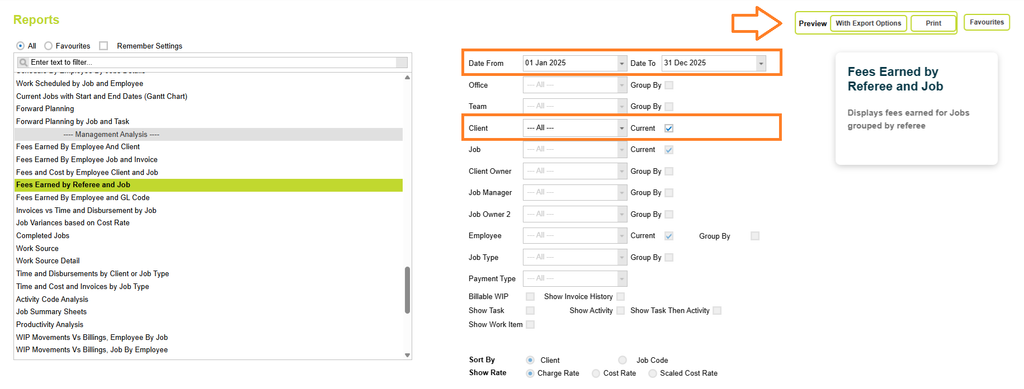
Now click on the Preview button and select one of the preview options (Print or with Export options).
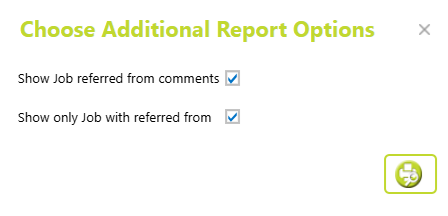
Then select whether to view all jobs, or only those with a referral name recorded.
You can also choose to show any referral comments.
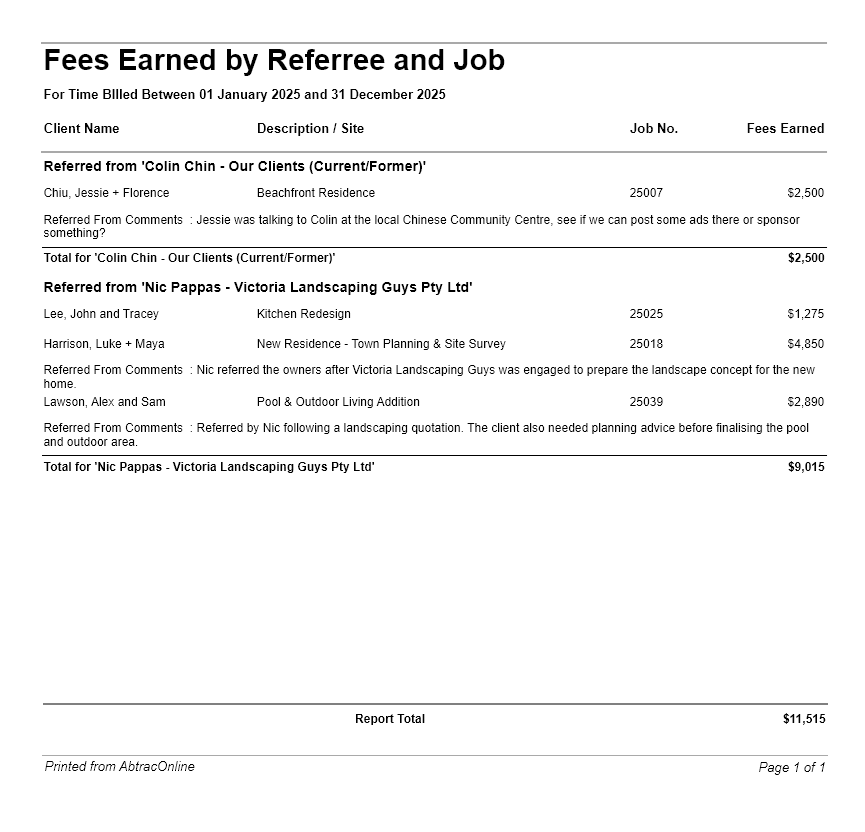
Understanding the data
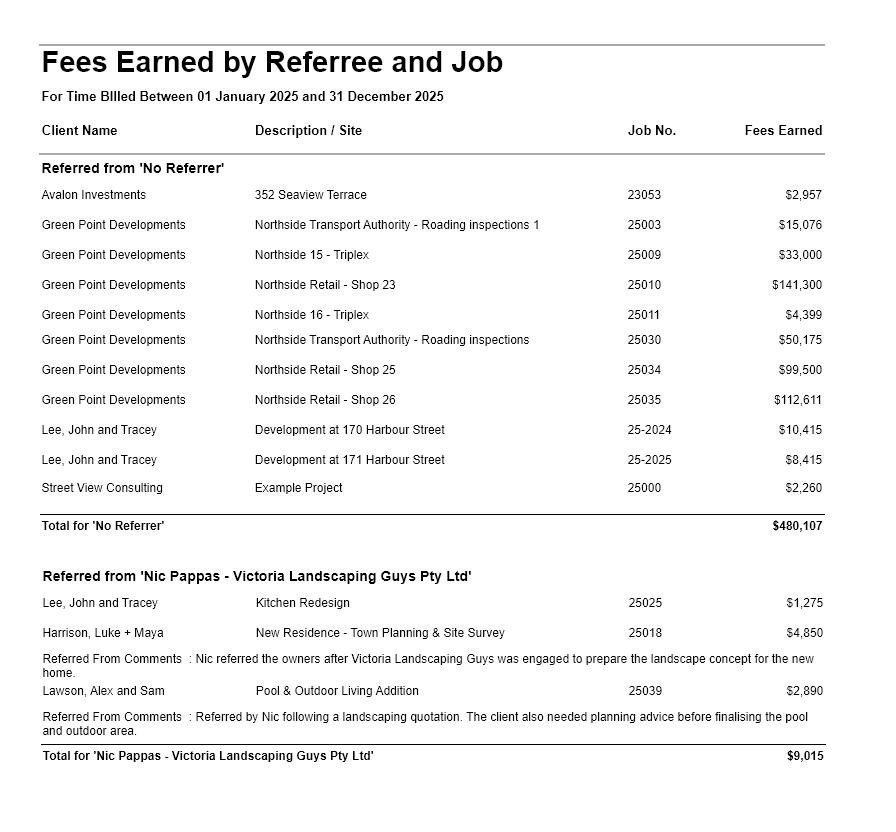
The report groups the results by Referred From source. For each referral source, the report lists the individual jobs that have generated fees during the selected reporting period.
It also displays the total fees earned for each referrer.
Columns include:
- Client Name
- Job Description
- Job Code
- Fees Earned
At the end of the report, totals are provided for all Fees Earned for the period.
Date range
The report includes projects where invoices were created within the selected date range and those invoices have time assigned to them. An invoice date falling within the selected period is not enough on its own—the invoice must also have time assigned.
The date the WIP was assigned to the invoice does not affect the report.
Referred From
The Referred From field records the person or organisation that referred the job to your business. The referral source is recorded against the job and can then be used in referral reporting.
Read more about Referred from here
Referred From Comments
Additional information about the referral can be recorded separately from the Referred From person or organisation. Comments are useful for recording context about where the referral came from or potential follow-up opportunities.
If Show Job referred from comments is selected, these comments can be displayed alongside the relevant referral information in the report.
Read more about Referred from here
Show only Jobs with referred from/ No Referrer
If selected, ‘Show only Jobs with referred from’ will exclude jobs that do not have a Referred From source recorded.
Otherwise the report will show all Fees Earned for the period, grouping jobs without a Referred from reference in a “No Referrer’ group.
Client Name
The client associated with the job.
Description / Site
The job description from the job details page.
Fees Earned
The Fees Earned amount is based on the fee contribution of timesheet lines that have been assigned to invoices.
This means the Fees Earned amount is usually, but not necessarily the same as:
- the total value of all time recorded against the job;
- the job’s original fee estimate;
- the total amount invoiced for the job; or
- the amount paid by the client.
Only timesheet lines that have been assigned to invoices contribute to the amount shown in this report.
Read more about Fee contributions here
Report totals
At the end of each Referred From group, the report shows a total for the fees earned from jobs associated with that referral source.
The report also provides an overall total for the selected reporting period.
Why a referred job may not appear in this report
A job can have a Referred From source recorded and still have no fees shown in this report.
For example, a job may have been referred and created during the reporting period, but:
- no invoice has been created yet; or
- an invoice has been created without any assigned timesheet lines
In these situations, the job can appear in the Referrals report but not yet appear in the Fees Earned by Referee and Job report. The Referrals report is based on the job creation date, whereas the Fees Earned report uses the invoice date, in conjunction with the assigned timesheet line requirement.
Abtrac KB# 2290