
Abtrac’s productivity reporting often compares an employee’s Chargeable Hours against their Standard Hours (required working hours) for the selected reporting period.
How Standard Hours are calculated depends on how the employee’s Required Units have been configured.
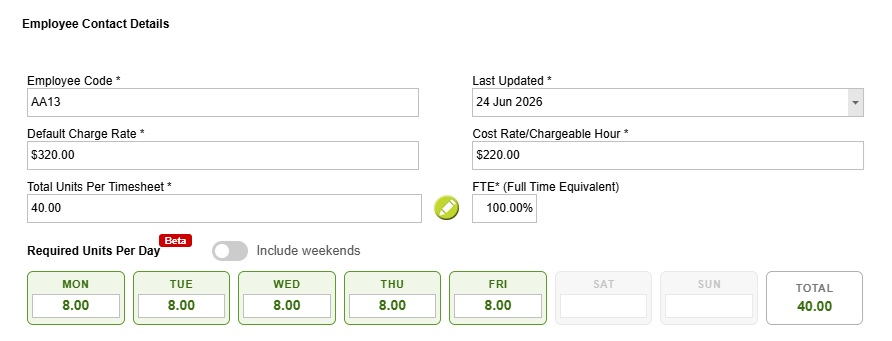
Employees with Required Units per Timesheet Period
If an employee’s Required Units are configured per timesheet period (for example, 40 hours per weekly timesheet), Standard Hours are calculated using complete timesheet periods.
This works well when the report is run using the same date range as your timesheet periods.
For example, if employees complete weekly timesheets (Monday to Sunday) and are required to work 40 hours per week, a report run from 29 December 2025 to 25 January 2026 includes four complete timesheet periods:
| Timesheet Period | Standard Hours |
|---|---|
| 29 Dec 2025 – 04 Jan 2026 | 40 |
| 05 Jan 2026 – 11 Jan 2026 | 40 |
| 12 Jan 2026 – 18 Jan 2026 | 40 |
| 19 Jan 2026 – 25 Jan 2026 | 40 |
| Total Standard Hours | 160 |
Because the report aligns with complete timesheet periods, the Standard Hours are calculated as expected.
Running reports for a calendar month
If the same employee is reported on for 01 January 2026 – 31 January 2026, the report period begins and ends part-way through a weekly timesheet.
Although only part of the first and last timesheet periods fall within the report, Required Units are not pro-rated when they are defined per timesheet period.
As a result, the calculated Standard Hours may appear higher or lower than expected.
For this reason, it is recommended that Employee Productivity Reports are run using the same date range as your timesheet periods whenever Required Units are configured at the timesheet level.
Employees with Daily Required Units
If an employee is configured with Daily Required Units, Standard Hours are calculated for each day that falls within the reporting period.
For example, if an employee is required to work:
- Monday to Friday
- 8 hours per day
- 40 hours per week
and the report is run for 01 January 2026 – 31 January 2026, Abtrac counts each working day individually.
| Date Range | Working Days | Standard Hours |
| 01 Jan – 02 Jan (Thu–Fri) | 2 | 16 |
| 05 Jan – 09 Jan | 5 | 40 |
| 12 Jan – 16 Jan | 5 | 40 |
| 19 Jan – 23 Jan | 5 | 40 |
| 26 Jan – 30 Jan | 5 | 40 |
| 31 Jan (Sat) | 0 | 0 |
| Total | 22 | 176 |
Because Standard Hours are calculated from each working day, partial weeks are automatically handled correctly.
Which method should I use?
Both methods calculate Standard Hours correctly—they simply use different approaches.
- Required Units per Timesheet Period are best suited to organisations that report using complete weekly, fortnightly or monthly timesheet periods.
- Daily Required Units provide greater flexibility when reporting across arbitrary date ranges, such as calendar months or custom reporting periods.
If you regularly run Employee Productivity Reports for calendar months or other custom date ranges, configuring Daily Required Units will produce the most accurate Standard Hours calculations.
How to set Standard Hours (Required Units)
You can set required units for an employee timesheet period from Administration >> Employees >> Employee Details.
Once required units are set, you can view and report on hours remaining in a period, and the percentage hours worked.
How to apply required units and daily units
Abtrac KB # 2273