
A client recently asked how to understand employee earnings in Abtrac reports, especially when multiple employees work on the same job and the final invoice includes a write on or write off.
The question was mainly about how the following report figures are calculated:
- Units Billed
- Work Value Billed
- Fees Earned
- Time Allocated
- Prorated write ons and write offs
This article explains how these values are calculated and why reports may show similar, but not identical, figures depending on whether they are based on timesheet dates or invoice dates.
The Client Question
How much revenue do my employees generate?
The client wanted to understand how much each employee was earning for the business.
They also noted that this is not always a simple number to calculate, because several employees may work on the same job. If an invoice includes a write on or write off, the question becomes:
Who should be credited with the difference between the original WIP value and the final invoiced amount?
The answer is that Abtrac allocates the fees earned across the WIP assigned to the invoice or invoice line. Where applicable, any write on or write off is prorated across the people whose time has been assigned.
Read more about Fees Earned Calculations here
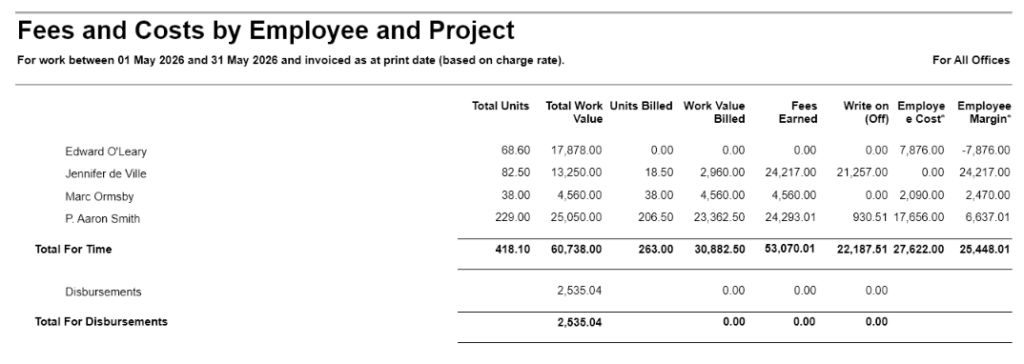
Fees and Cost by Employee, Client and Job Report
This report is based on timesheet entry dates. It calculates the fees and costs of work completed between the selected dates and invoiced as at the print date.
Units Billed
Units Billed are based on timesheets assigned to invoices for the date period entered.
This means the report looks at the timesheet date period, not the invoice date.
Work Value Billed
Work Value Billed is calculated from the billed units multiplied by the charge rate for each time entry.
In simple terms:
Work Value Billed = Units Billed x Charge Rate
The values are based on the relevant timesheet entries within the selected timesheet date range.
Fees Earned
Fees Earned is related to the invoice or invoice line that the time has been assigned to.
Where multiple WIP entries are assigned to the invoice or invoice line, the fees earned value is prorated across all assigned WIP.
For this report, the allocation is based on timesheet dates.
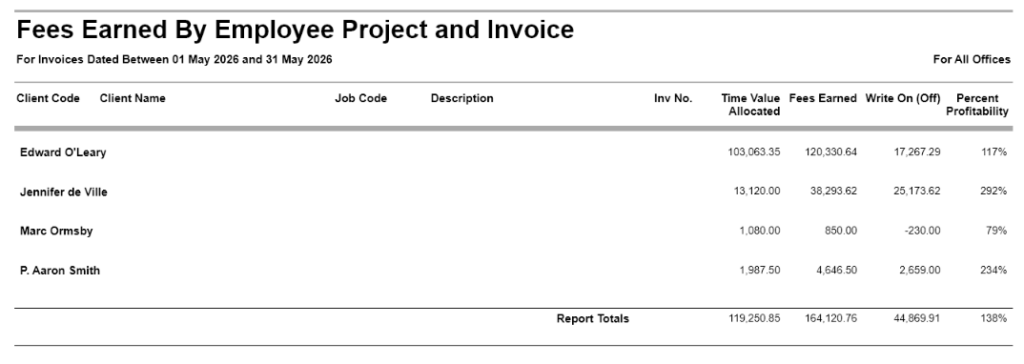
Fees Earned by Employee, Job and Invoice Report
This report is based on invoice dates.
Time Allocated
Time Allocated is similar to Units Billed in the Fees and Cost by Employee, Client and Job report.
The key difference is that this report is based on invoice dates, whereas the Fees and Cost by Employee, Client and Job report is based on timesheet entry dates.
Because of this, the two reports may show similar figures, but they may not always match exactly.
Fees Earned
Fees Earned is the total value of the invoice or invoice line that the time has been assigned to, prorated across all WIP assigned.
For this report, the allocation is based on invoice dates.
Why the two reports may be different
The figures may differ because the reports are based on different date logic.
The Fees and Cost by Employee, Client and Job report is based on timesheet entry dates.
The Fees Earned by Employee, Job and Invoice report is based on invoice dates.
For example, if time was entered in October but invoiced in November, it may appear differently depending on which report is being used and which date range has been selected.
What does prorated mean?
Prorated means that any write on or write off is shared across the WIP assigned to an invoice or invoice line.
The allocation is based on each person’s share of the total WIP assigned.
Example
Person A has $1,000 of time assigned to an invoice.
Person B has $2,000 of time assigned to the same invoice.
The total WIP assigned is therefore:
$1,000 + $2,000 = $3,000
If the final invoice amount is $4,000, there is a $1,000 write on.
Because Person A contributed one third of the total WIP, Person A receives one third of the write on.
Because Person B contributed two thirds of the total WIP, Person B receives two thirds of the write on.
Prorated result
Person A:
- Original WIP: $1,000
- Share of write on: $333.33
- Fees Earned: $1,333.33
Person B:
- Original WIP: $2,000
- Share of write on: $666.67
- Fees Earned: $2,666.67
The total fees earned still equals the invoice total:
$1,333.33 + $2,666.67 = $4,000
What happens with a write off?
The same principle applies when there is a write off.
If the total WIP assigned is higher than the final invoice amount, the reduction is shared across the assigned WIP based on each person’s proportion of the total assigned value.
For example, if Person A contributed one third of the assigned WIP and Person B contributed two thirds, the write off would be shared in the same proportions.
Is there one report that shows the full productivity and profitability picture?
The Fees Earned and Fees and Cost reports help explain the invoiced or earned value side of the story.
However, they do not show the full productivity picture by themselves, because they do not fully show non-productive or non-chargeable hours.
For a more complete view of employee productivity and profitability, these reports are often reviewed alongside the Hours Worked reports.
The Hours Worked reports help show chargeable and non-chargeable time, which gives more context when reviewing employee performance.
Recommended reports to use together
To review employee productivity and profitability more completely, consider using:
- Fees and Cost by Employee, Client and Job report
- Fees Earned by Employee, Job and Invoice report
- Hours Worked by Employee report
- Hours Worked by Employee, Client and Job report
- Other relevant Hours Worked reports depending on the level of detail required
Using these reports together provides a better overall picture of:
- time worked
- chargeable time
- non-chargeable time
- invoiced value
- earned fees
- write ons and write offs
- employee contribution to invoiced work
Summary
A client asked how Abtrac calculates employee earnings when multiple employees work on the same job and an invoice includes a write on or write off.
The answer is that Fees Earned is based on the invoice or invoice line value, allocated across the WIP assigned to that invoice or invoice line.
Where there is a write on or write off, the difference is prorated across the assigned WIP based on each person’s share of the total WIP.
The key date difference is:
- Fees and Cost by Employee, Client and Job is based on timesheet dates.
- Fees Earned by Employee, Job and Invoice is based on invoice dates.
For a fuller understanding of productivity and profitability, these reports should be reviewed together with Hours Worked reports, as those reports help identify chargeable and non-chargeable time.
Abtrac KB# 2265