
Tasks (also known as Stages or Phases) are the foundation of project budgeting and reporting in Abtrac.
They allow you to break a project into meaningful sections, assign budgets, record work against those budgets, and analyse project performance over time.
However, it is important to understand that job budgets, timesheets entered and invoiced amounts do not all interact with tasks in the same way.
Looking at task reporting
Tasks are used differently by budgets, timesheets, invoice lines, and Fee Contribution calculations. As a result, task-level budget, work completed, and invoiced values will not always match, even when the overall job totals are correct.
Understanding which task value a report is using is essential when analysing project performance.
Task Types Quick Reference: Budget → Work Done → Revenue Entered → Revenue Earned
| Item | What it represents | Source |
|---|---|---|
| Job Task | Budgeted fee for a stage | Job Tasks Budgets |
| Timesheet Line Task | Work logged | Timesheets (Disbursements) |
| Invoice Line Task | Revenue explicitly assigned to a task | Invoice line Task field |
| Fee Contribution | Revenue earned by work logged | Assigned time/disbursements |
Job Tasks, Timesheet Tasks, Invoice Line Tasks and Fee Contribution
The following sections explain how each of these task concepts is used within Abtrac reporting.
Search Jobs and Tasks page
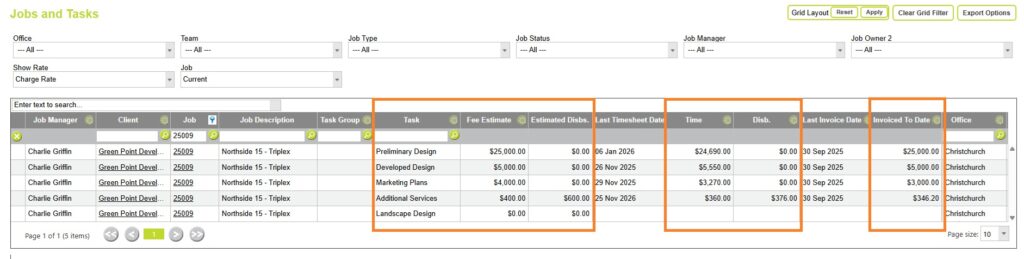
You can view values for Job Tasks (Fee Estimate), Timesheet Task Values (Time), and Invoice Line Tasks (Invoiced to Date) from the Search Jobs and Tasks page.
Job Task
A Job Task represents a stage or phase of a project and is where the project’s fee estimate or budget is recorded. The Fee Estimate shown against a task is the amount originally budgeted for that stage of work.
These budgets become the benchmark used by Actual vs Budget reports.
Timesheet Task
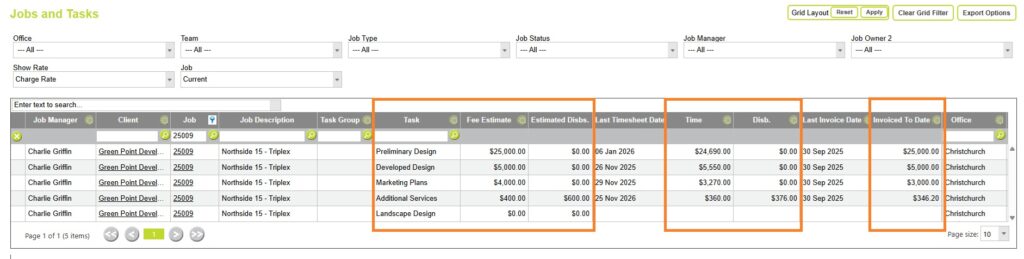
A Timesheet Task is created when employees assign their timesheet entries to a specific task. The Time value reported against a task is the accumulated value of all timesheet entries allocated to that task. This allows you to compare the actual work completed against the original fee estimate and measure progress, utilisation, and budget consumption.

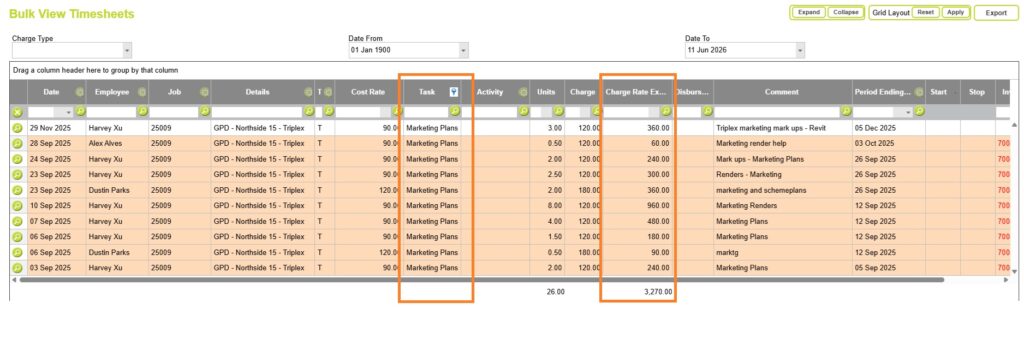
Because timesheet entries are linked directly to tasks, Abtrac can accurately calculate:
- Actual hours by task
- Actual value by task
- WIP by task
- Budget consumption by task
Invoice Line Task
An Invoice Line Task is recorded when a task is selected in the Task field of the Create/Edit Invoice Line window, either manually by the user or automatically by some of Abtrac’s invoice generation processes.
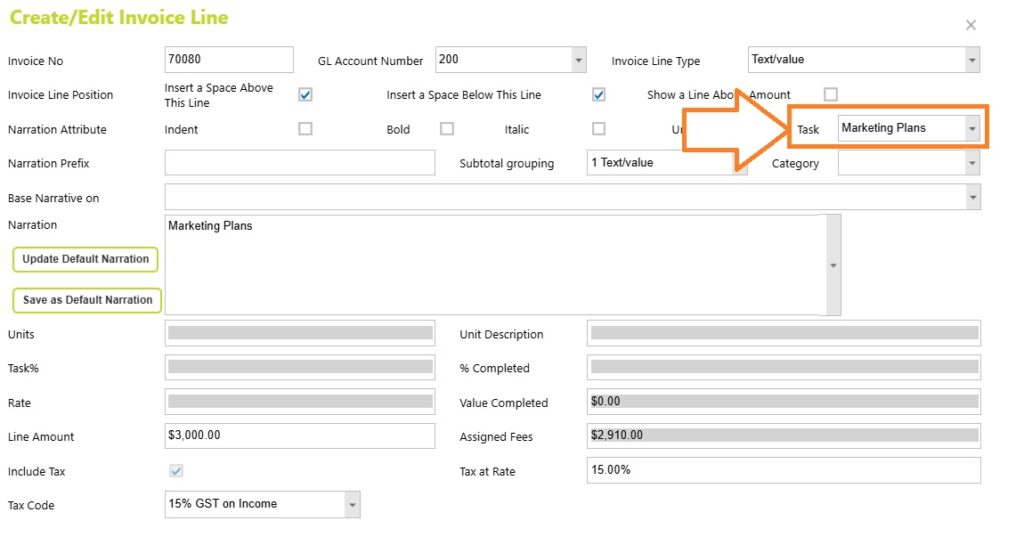
This task selection is stored against the invoice line itself and is used for task-based invoicing reports.
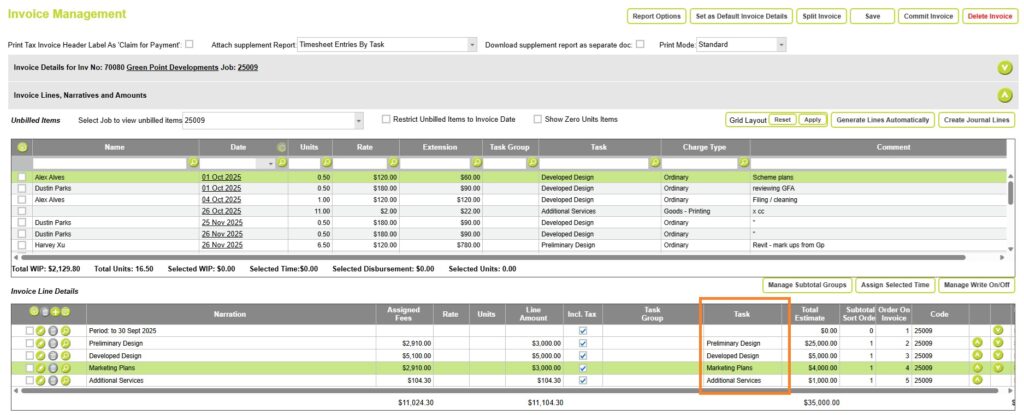
Invoice Line tasks are not neccessarily related to time assigned to the invoice
Recording an invoice line task is separate from the process of assigning timesheets or disbursements to an invoice line using the Assign Selected Time button, which links work to the invoice but does not necessarily set the invoice line’s Task field.
Although the time assigned in the image below belongs to a job task, the invoice line may not have that same job task recorded against the line amount.
Invoice Line Tasks are useful when you want to know how revenue was entered or allocated during invoicing.
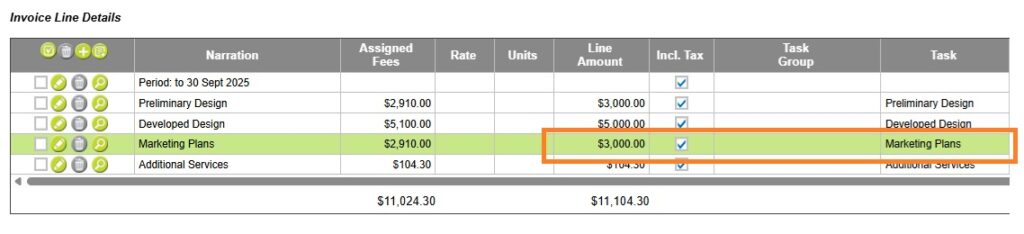
However, Invoice Line Tasks do not necessarily represent:
- Where work was performed
- Which task generated the revenue
- How staff time was distributed across tasks
To understand where revenue was earned based on completed work, use Fee Contribution reporting.
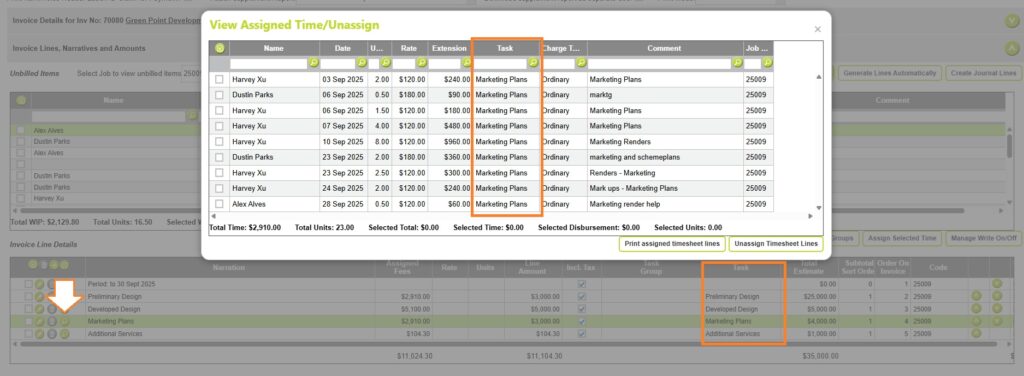
Fees Earned (Fee Contribution)
Fee Contribution allocates invoiced revenue based on the value of work completed and assigned to an invoice.
A useful way to think about the difference is:
- Invoice Line Tasks tell us where revenue was entered.
- Fee Contribution tells us where revenue was earned.
When Fee Contribution is configured to use the Invoice Line allocation method, Abtrac distributes the invoice value across the work assigned to that invoice line. If all the timesheets assigned to an invoice line belong to the same task, the Fee Contribution attributed to that task will often equal, or be very close to, the invoice line amount itself.
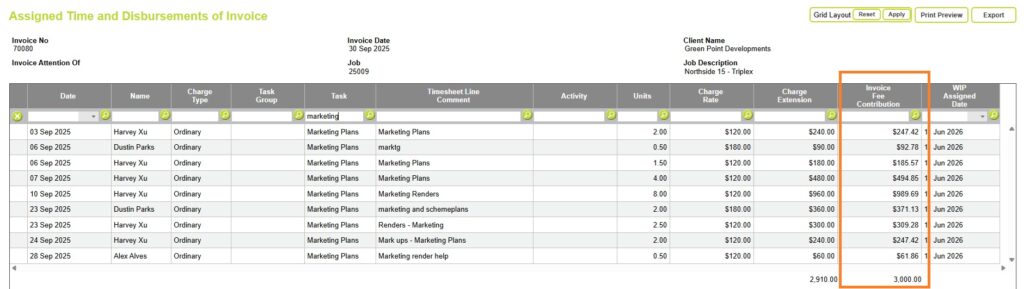
For example, an invoice may contain a single invoice line allocated to Marketing Plans. However, the underlying work may have been completed across multiple tasks.
In this situation:
- Invoice Line Task reporting will show all revenue against Marketing Plans.
- Fee Contribution reporting will distribute revenue across the tasks where work was performed.
This distinction is one of the most common causes of differences between task-level invoice reports and task-level progress reports.
Read more about Fee Contributions here
Example: Invoice Line Task vs Fee Contribution
Invoice Line Task Reporting vs Fee Contribution Reporting
An invoice line for $3,000 may have Marketing Plans selected in the invoice line Task field. In this case, Invoice Line Task reporting attributes that entire $3,000 directly to the Marketing Plans task.
For example, Project 25009 (Invoice 70080) contains invoice lines assigned to specific tasks. The resulting task allocations are:
- Preliminary Design: $3,000.00
- Marketing Plans: $3,000.00
- Developed Design: $5,000.00
- Additional Services: $104.30
Total invoiced fees: $11,104.30
Project 25009 – Invoiced by Task
Invoice Line Task reporting attributes revenue according to the task selected on each invoice line.

However, if an invoice line contains timesheets assigned to multiple tasks, Fee Contribution reporting may distribute the invoiced value across those tasks based on the work assigned to the invoice.
Project 25011 – Invoiced without Tasks (Fees assigned to a line amount)
Project 25011 (Invoice 70084) contains the same total invoiced amount of $11,104.30, but the invoice was not allocated to individual tasks.

Instead, Fee Contribution reporting distributes the invoiced value across the contributing tasks based on the timesheets assigned to the invoice.
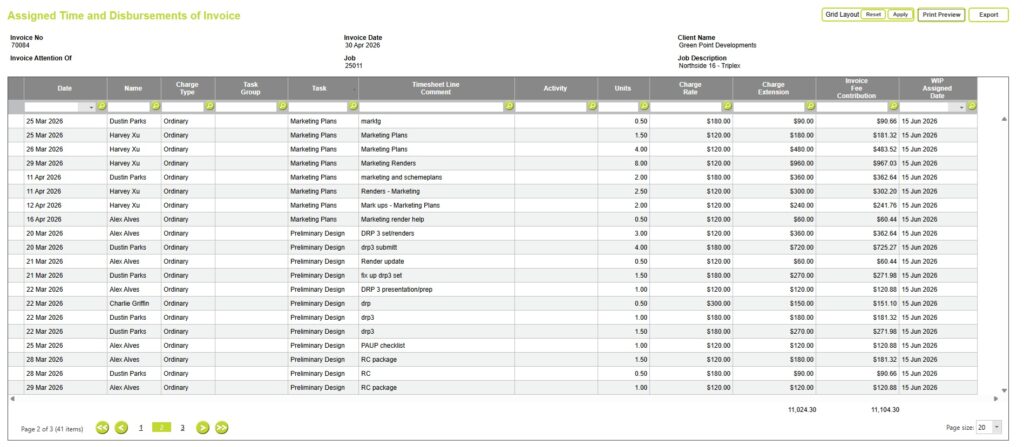
This results in the following task allocations:
Fee Contribution distributes the invoiced amount proportionally across the contributing tasks based on their share of the assigned time value:
| Task | Assigned Time Value | Fee Contribution |
| Preliminary Design | $2,910.00 | $2,931.33 |
| Marketing Plans | $2,910.00 | $2,931.33 |
| Developed Design | $5,100.00 | $5,137.34 |
| Additional Services | $104.30 | $104.30 |
| Total | $11,024.30 | $11,104.30 |
For example:
- Preliminary Design represents 26.40% of the assigned time value ($2,910.00 ÷ $11,024.30).
- Marketing Plans also represents 26.40%.
- Developed Design represents 46.26%.
- Additional Services represents 0.95%.
(Although in realty the Fee contribution has been calculated for each timesheet line assigned to produce the Fee Contribution values shown above.)
Job Progress by Task Reporting
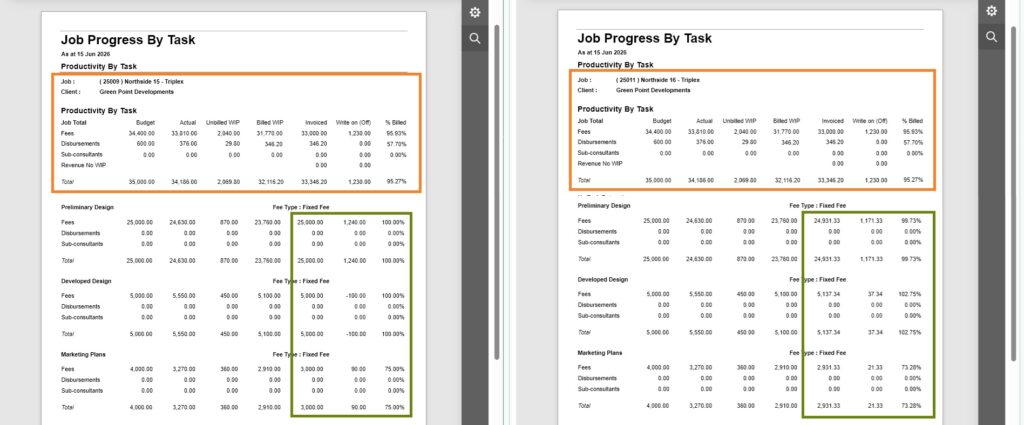
Although both invoices have the same total value, the task-level revenue allocations differ because one invoice was explicitly allocated by task and the other was apportioned using Fee Contribution calculations.
At the job level, both invoicing methods produce the same invoiced total of $11,104.30.
| Invoice 70080 | Invoice 70084 | |
|---|---|---|
| Invoice Lines assigned to Tasks | Yes | No |
| Task Revenue Source | Invoice Line Task | Fee Contribution |
| Job Total Revenue | $11,104.30 | $11,104.30 |
| Task Revenue Allocation | Explicit | Calculated |
The difference occurs at the task level:
- Project 25009 (Invoice 70080) can report actual invoiced amounts by task because the invoice lines were explicitly assigned to tasks.
- Project 25011 (Invoice 70084) cannot report exact invoiced amounts by task because the invoice was not allocated by task. Instead, revenue is distributed using the Fee Contribution calculation based on the assigned timesheets.
As a result, Invoice Line Task reporting and Fee Contribution reporting may produce different task-level revenue values, even though they are reporting on the same overall invoiced amount.
Why Invoice Reporting by Task Can Differ From Timesheet Reporting (Actual vs Budget)
The same task may have different values for Fee Estimate, Time, Invoiced To Date and Fee Contribution because each value is calculated differently.
Task reporting can be interpreted as follows:
- Fee Estimate = What was budgeted for the task.
- Time = The value of work recorded against the task via timesheets.
- Invoiced To Date = Revenue from invoice lines explicitly assigned to the task.
- Fee Contribution (Fees Earned) = Revenue attributed to the task based on the time and costs that were billed, regardless of whether the invoice line itself was assigned to a task.
Comparing these values provides a more complete picture of project performance.
Task-level invoice reports can produce different results depending on whether they use:
- Invoice Line Tasks, or
- Fee Contribution calculations.
Neither approach is wrong; they simply answer different questions. When invoice line tasks are used consistently, Invoiced To Date and Fee Contribution will often be similar.
| Question | Use |
|---|---|
| Which task was selected on the invoice? | Invoice Line Task |
| Which task earned the revenue? | Fee Contribution |
| How much work was completed on a task? | Timesheet Task |
| How does actual performance compare to budget? | Job Progress Reports |
| Why do task-level invoice values differ from work completed values? | Compare Invoice Line Task and Fee Contribution |
When analysing project profitability or progress against budgets, Fee Contribution will generally provide the most meaningful comparison because it reflects where work was actually completed.
Invoice Line Task reporting is most useful when reviewing invoicing practices or checking how revenue was allocated during invoice creation.
What Reports Can Reliably Tell You
These reports are generally reliable when staff consistently assign tasks to timesheets:
- Actual Hours by Task
- Actual Value by Task
- WIP by Task
- Budget Consumption by Task
- Task Variance Reports
Because these values come directly from task-assigned time and disbursements.
Why Task-Level Invoice Reports Can Be Misleading
Task-level invoicing reports should be interpreted carefully when invoice lines have not been assigned to tasks.
In these cases:
- Job-level invoice totals remain correct.
- Task-level invoice totals may be incomplete.
- Some reports calculate task-level invoice values using Fee Contribution rather than Invoice Line Tasks. Depending on the report, these values may be labelled as Fees, Invoiced, Billed, Fees Earned, or Fee Contribution.
- Revenue may appear under “No Task Entered”.
- Task profitability may not reflect actual billing performance.
Understanding “No Task Entered”
Some reports include a “No Task Entered” line.
This usually indicates one of two situations:
- Time was entered without selecting a task.
- Invoice revenue exists that cannot be associated with a specific task.
In this situation, project-level reporting remains accurate, but task-level revenue reporting becomes less reliable.
Best Practice Recommendations
To get the most accurate budget and profitability reporting:
- Create tasks that reflect the stages of your proposal.
- Enter fee budgets against those tasks.
- Require staff to assign tasks when entering timesheets.
- Assign disbursements to tasks where possible.
- Use task-based invoice generation
- Allocate invoice lines to tasks whenever practical.
- Review reports regularly for activity recorded against “No Task Entered”.
Summary
Tasks are the link between your project budget and the work completed by your team. Timesheets and disbursements are usually assigned directly to tasks, making budget consumption reporting highly reliable.
Invoice reporting is more complex. Revenue can be attributed to tasks either through the task selected on an invoice line, or through Fee Contribution based on the work assigned to the invoice. Different reports may use one method or the other.
When invoice amounts are entered without a task or without assigned time or costs, Abtrac may be unable to determine which task generated the revenue.
For this reason, task-based budgeting and time reporting are generally the most accurate measures of project performance, while task-based invoicing reports depend on how consistently invoice lines are linked back to the work being billed.
Abtrac KB # 2261