
Rather than storing usernames and passwords or relying on long-term credentials, MYOB now requires applications such as Abtrac to obtain explicit consent from an authorised MYOB Administrator and use secure access tokens to communicate with MYOB.
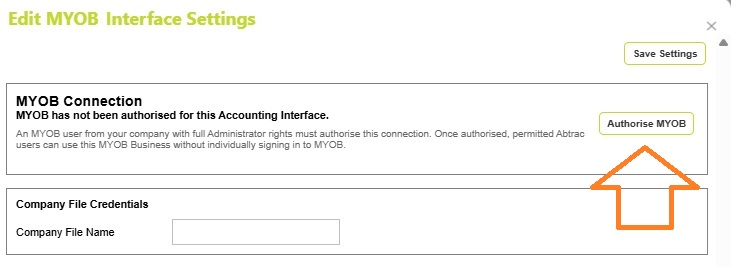
When an MYOB Administrator clicks Authorise MYOB in Abtrac, they are redirected to MYOB to log in and can grant Abtrac permission to access the selected company file. MYOB then issues secure authentication tokens that allow Abtrac to communicate with MYOB on the organisation’s behalf.
MYOB Shared Connection Model
Unlike some integrations where each user must authenticate individually, the MYOB Business interface uses a single organisation-level authorisation.
Once the connection has been authorised:
- The MYOB Administrator does not need to re-authorise each Abtrac user.
- Users with appropriate permissions in Abtrac can upload invoices and import MYOB data using the shared connection.
- Abtrac securely manages access using the authorisation granted to the accounting interface.
Access Tokens and Refresh Tokens
When the connection is authorised, MYOB issues:
- An Access Token, which is used by Abtrac when making requests to MYOB.
- A Refresh Token, which allows Abtrac to request a new Access Token when the existing token expires.
This means users are not normally required to sign into MYOB each time they upload invoices or import bills. The connection remains active because Abtrac can obtain replacement Access Tokens using the Refresh Token provided by MYOB.

When Reauthorisation May Be Required
Although MYOB manages token renewal automatically through the refresh token process, reauthorisation may occasionally be required if:
- The MYOB Administrator revokes access.
- The MYOB company file is changed.
- The MYOB user used for authorisation is removed or loses administrator permissions.
- MYOB security policies require renewed consent.
- The stored authorisation tokens become invalid.
If this occurs, the “MYOB has not been authorised for this Accounting Interface” message will be displayed and an MYOB Administrator can simply click Authorise MYOB again.
MYOB App Connections
The App Connections page in MYOB is where you can see which third-party apps are connected to MYOB Business and what data they can access. You can also use this page to renew or disconnect a connected app.
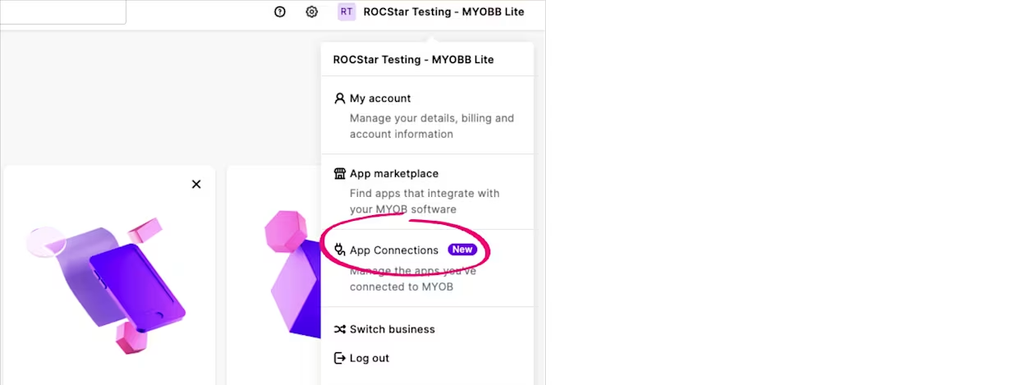
Only users with the MYOB role of Administrator can change app connections. Non-admin users may be able to view some connection details, but they can’t renew or disconnect apps.
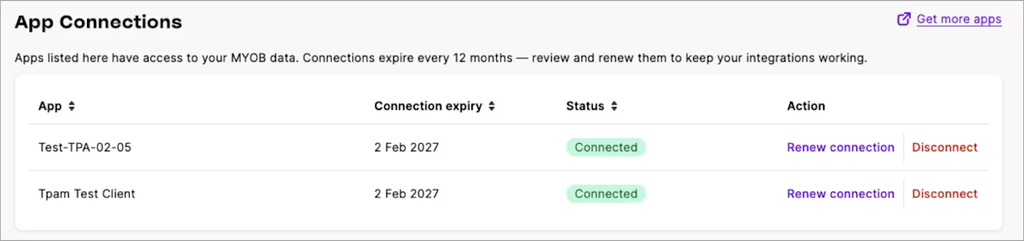
Read more about MYOB App connections here
MYOB Administrator Requirement
MYOB requires the user granting access to be an Administrator of the MYOB company file. This ensures that Abtrac receives permission to access the company data needed for invoice uploads, customer synchronisation, job creation, tax code retrieval, and bill imports.
Note: The authorising MYOB account is used only to grant access. Once authorised, day-to-day invoice uploads and bill imports can be performed by permitted Abtrac users without requiring them to log into MYOB individually.
Abtrac KB# 2284