
The Employee Productivity (Separating Not at Work) Report provides a summary of productive and non-productive time recorded by each employee during the selected reporting period.
The report summarises each employee’s recorded hours, showing the split between chargeable and non-chargeable (billable and non-billable) time.
With the At Work inclusion, the Employee Productivity (Separating Not at Work) report provides additional visibility into employee availability, as well as utilisation. This avoids penalising staff who have taken approved leave, but otherwise met their targets.
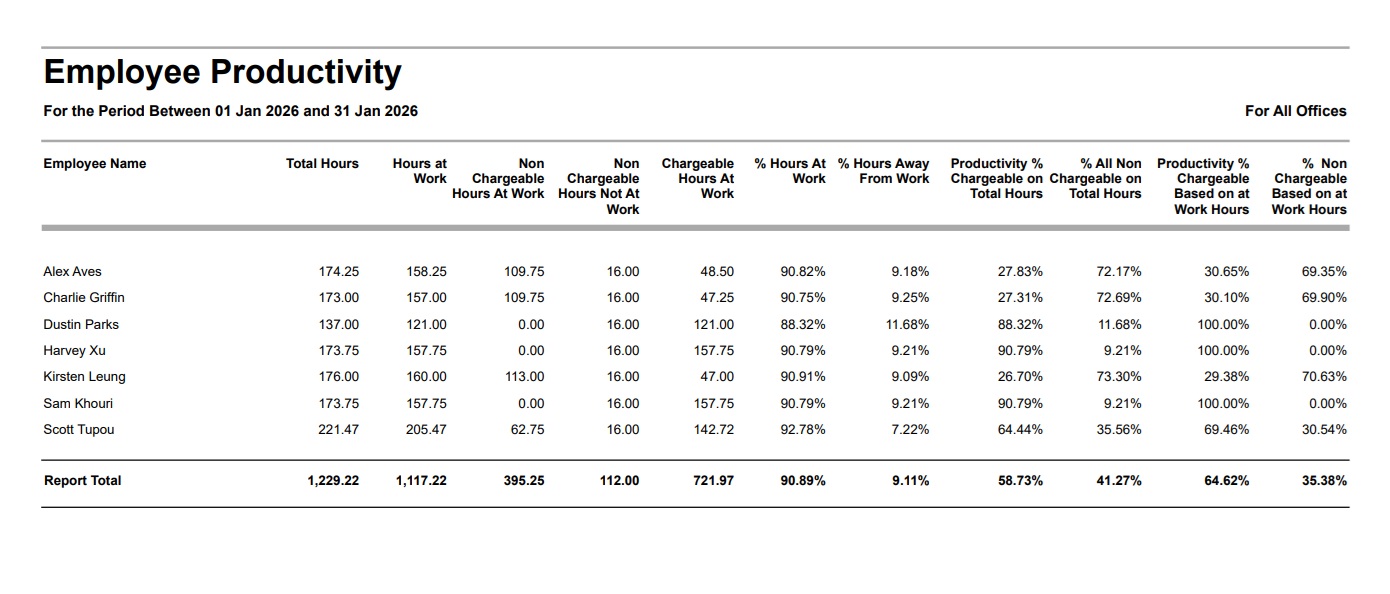
Employee Productivity (Separating Not at Work) Report
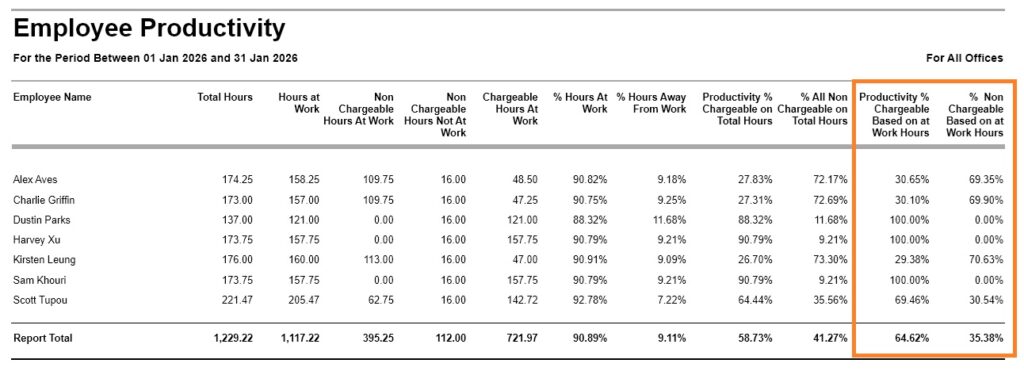
The Employee Productivity (Separating Not at Work) Report provides a summary of employee productivity and work utilisation during the selected reporting period.
It shows the split between chargeable and non-chargeable hours, calculates productivity against both total recorded hours and hours worked while at work, and separates non-chargeable time into working activities (such as administration or training) and time away from work (such as leave or absences).
Go to Reports > Performance Reports > from the ‘Management Analysis’ section, click on ”Employee Productivity (Separating Not at Work)’
Select the required date range.
Employee Productivity (Separating Not at Work) Report – Filter, Sort and Grouping Options
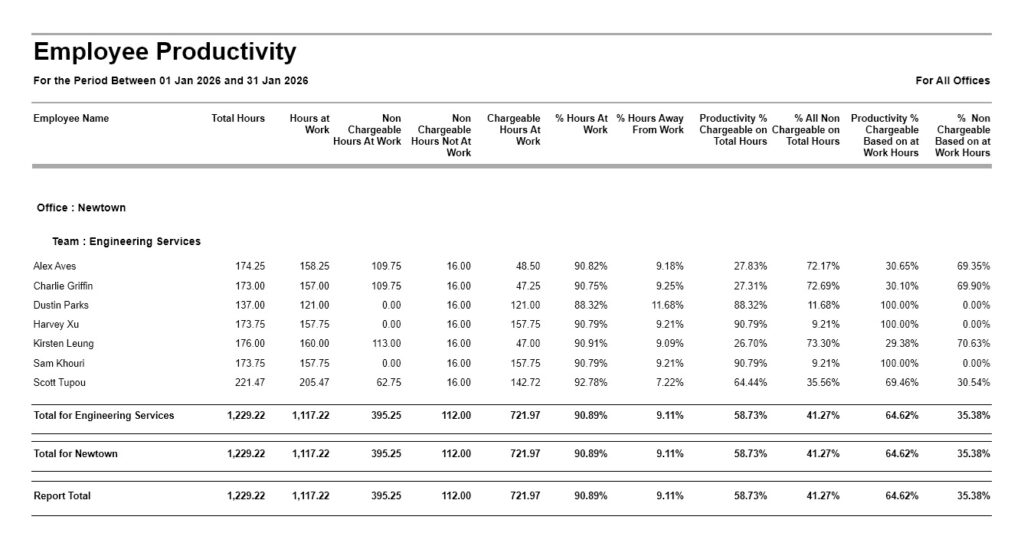
You can also optionally filter and group this report by Employee Office, and Employee Team.
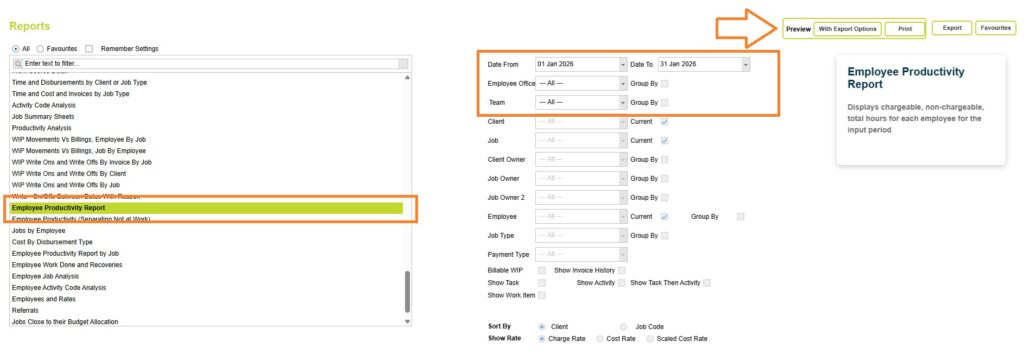
Now click on the Preview button and select one of the preview options (Print or with Export options) to view the Employee Productivity report.
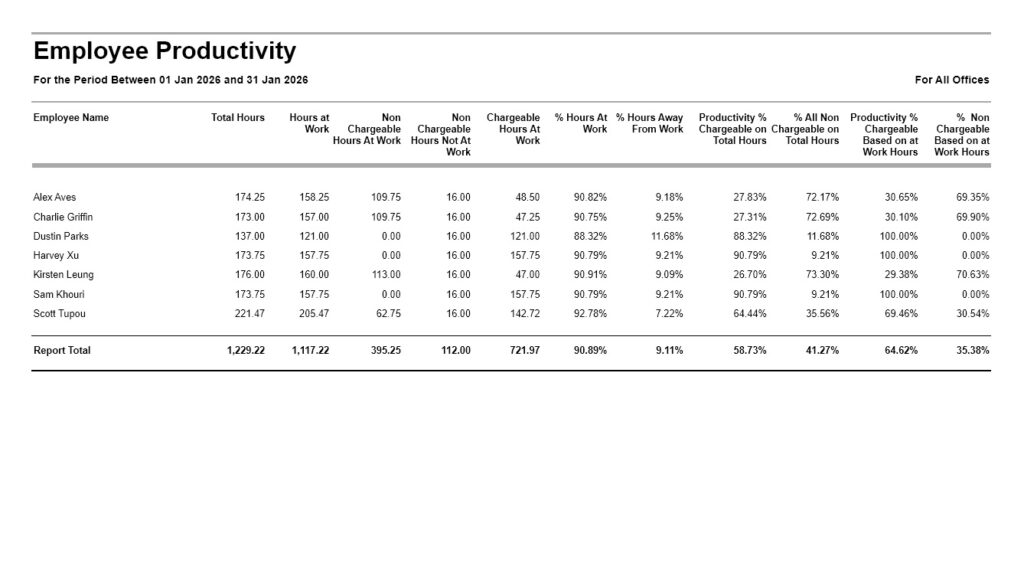
Understanding the data
The Employee Productivity (Separating Not at Work) Report provides an overall view of employee productivity across the selected reporting period.
It shows for each Employee:
- Total Hours
- Hours at Work
- Non-Chargeable Hours at Work
- Non-Chargeable Hours Not at Work
- Chargeable Hours at Work
- % Hours at Work
- % Hours Away from Work
- Productivity % Chargeable on Total Hours
- % All Non-Chargeable on Total Hours
- Productivity % Chargeable Based on At Work Hours
- % Non-Chargeable Based on At Work Hours
At the end of the report, an overall total is displayed for all employees included in the report. When Grouping by Employee Office and Employee Teams subtotal values are also displayed.
Date
The Employee Productivity (Separating Not at Work) Report is based on timesheet line dates.
Total Hours
The total number of hours recorded by the employee during the reporting period.
This includes both chargeable and non-chargeable time. You can review the total hours recorded for all employees for the same period from the Bulk View Timesheets report, when grouping by the Employee column, or by view any Hours Worked report.
The total hours in this report balance to:
Total Hours =
Hours At Work + Non Chargeable Hours Not At Work
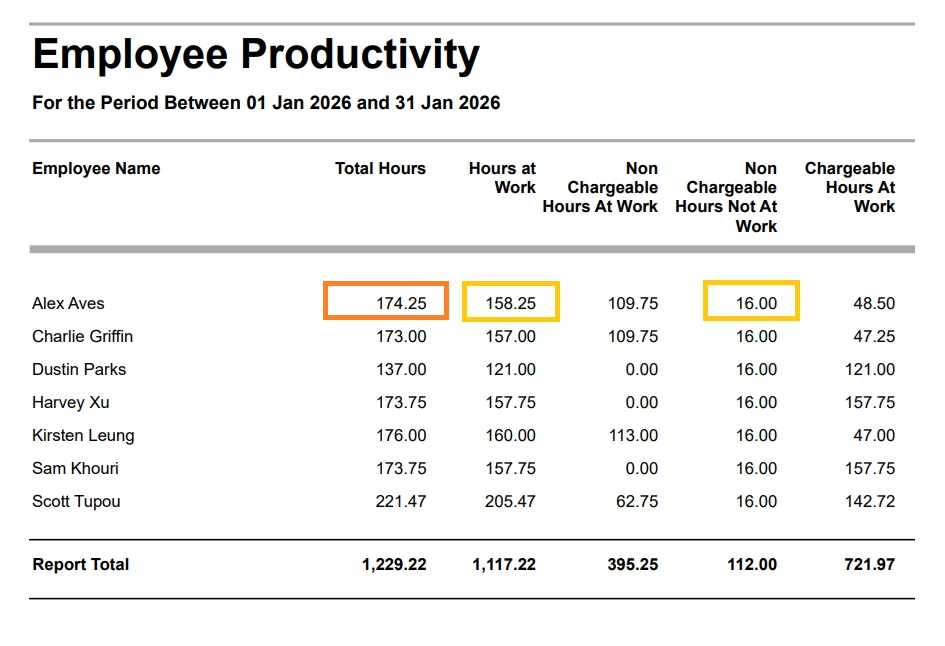
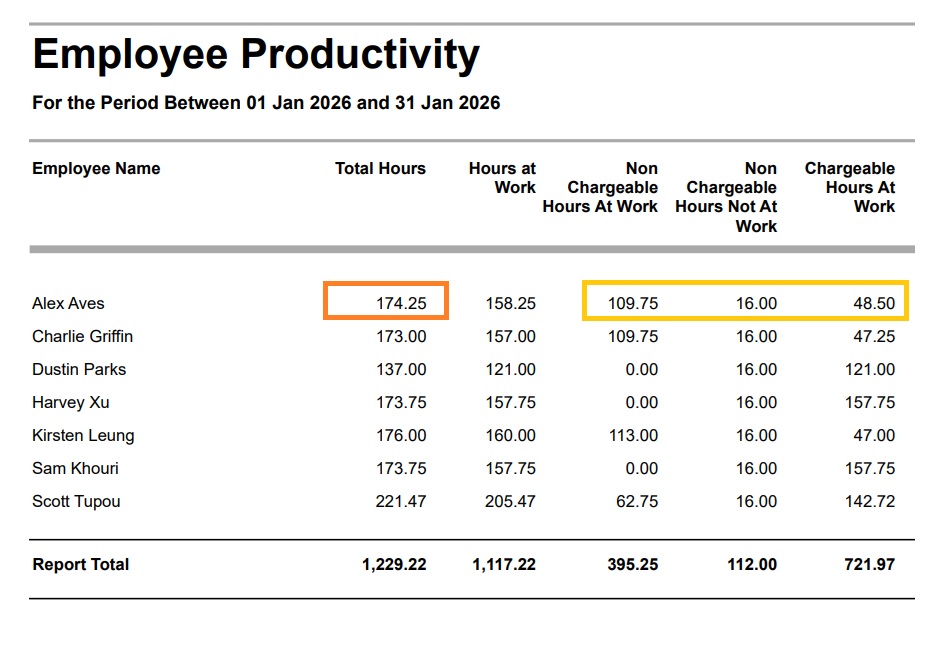
Total hours can also be viewed as:
Total Hours =
(Non Chargeable Hours At Work + Non Chargeable Hours Not At Work)
+ Chargeable Hours At Work
Hours at work
Shows employee hours only for projects classified as At Work, whether chargeable or non-chargeable.
This excludes time entered against jobs that have been marked as Not At Work, such as annual leave, public holidays or other approved absences. This often provides a more accurate measure of productive time because it focuses only on the time an employee was actually available for work.
Read more about the At Work/Not At Work classification here
Non Chargeable Hours At work
Shows employee hours only for non-chargeable projects classified as At Work – typically time recorded while the employee was working, such as administration, training, meetings or other internal activities.
You can review a list of non-billable, at work projects from the Search Clients and Jobs page, when filtering by the At Work column.
View the filter options for the Search Clients and Jobs page here
Non Chargeable Hours Not At work
Shows employee hours only for non-chargeable projects classified as Not At Work, such as annual leave, public holidays or other approved absences.
You can review a list of non-billable, Not at work projects from the Search Clients and Jobs page, when filtering by the At Work column.
Chargeable Hours At Work
The total number of chargeable (billable) hours recorded by the employee during the selected reporting period.
These are hours entered against projects marked as billable and At Work. (Typically all chargeable hours will also be at work hours)
Why are there three utilisation percentages?
The report includes three different utilisation measures because each answers a different management question:
- How much of an employee’s recorded time were they available to work?
- What percentage of all recorded time was chargeable?
- How productively did an employee use the time they were actually at work?
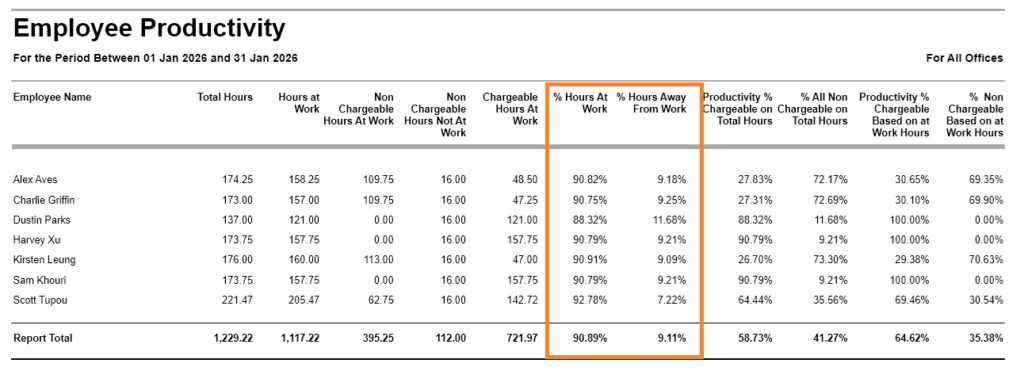
% Hours At Work vs % Hours Away From Work
Question answered: How much of an employee’s recorded time were they available to work?
This measure simply separates an employee’s total recorded hours into:
- Time spent at work
- Time spent away from work (such as annual leave, sick leave or other absences)
These two percentages always total 100%.
This provides a quick indication of employee availability during the reporting period, but does not measure productivity or billable utilisation.
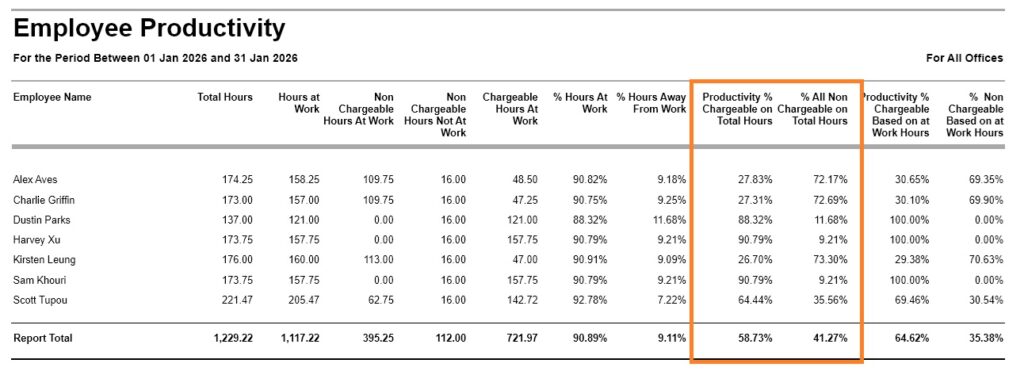
Productivity % Chargeable vs Non Chargeable on Total Hours
Question answered: What percentage of all recorded time was chargeable?
This calculation compares chargeable hours against all recorded hours, including leave and other time away from work.
This provides an overall utilisation measure for the reporting period, but productivity will naturally reduce if an employee has taken annual leave, sick leave or other approved absences.
For example, an employee who takes two weeks of annual leave may appear less utilised than someone who worked the entire month, even if both spent the same proportion of their working time on chargeable work.
Productivity % Chargeable Based on At Work Hours
Question answered: How productively did an employee use the time they were actually at work?
This calculation removes leave and other absences from the equation, measuring chargeable hours only against the hours the employee was available to work.
This makes it easier to compare employee productivity fairly, because staff are not penalised for taking approved leave or other time away from work.
It focuses on how effectively employees used their working time while they were available, making it a useful measure when comparing utilisation between employees or teams.
Productivity % Chargeable Based on At Work Hours and % Non Chargeable Based on At Work Hours always total 100%.
% Hours at work
The percentage of the employee’s total hours that were recorded as Hours at Work.
This is calculated as:
% Hours at work =
Hours At Work ÷ Total Hours × 100
The % Hours at work indicates how much of the employee’s available time was spent working compared to time away from work.
% Hours Away From Work
The percentage of the employee’s total hours that were recorded as Hours for Non billable projects that are also Not at Work.
This is calculated as:
% Hours Away From Work =
Non Chargeable Hours Not At Work ÷ Total Hours × 100
This is the proportion of time attributed to leave, absence or other non-working periods.
Productivity % Chargeable on Total Hours
This calculation shows chargeable hours as a percentage of all recorded hours.
This is calculated as:
Productivity % Chargeable on Total Hours =
Chargeable Hours ÷ Total Hours Recorded × 100
This measure provides a view of overall utilisation, including time away from work. This percentage includes all recorded time, including leave, administration and other non-chargeable time.
% All Non Chargeable on Total Hours
Shows the percentage of the employee’s recorded time that was entered against non-billable projects (including time away from work).
This is calculated as:
% All Non Chargeable on Total Hours =
Non Chargeable Hours ÷ Total Hours Recorded × 100
Productivity % Chargeable Based on At Work Hours
Shows chargeable hours as a percentage of the hours the employee was actually at work.
The calculation is:
Productivity % Chargeable Based on At Work Hours =
Chargeable Hours ÷ At Work Hours × 100
Unlike Productivity % Chargeable on Total Hours, this calculation excludes leave and other time away from work. It measures how productively an employee used their available working time, without reducing their productivity percentage because they took annual leave, sick leave or other approved absences.
% Non Chargeable Based on At Work Hours
This shows non-chargeable hours as a percentage of the hours the employee was actually at work.
The calculation is:
% Non Chargeable Based on At Work Hours =
Non Chargeable Hours At Work ÷ At Work Hours × 100
Because this calculation excludes leave and other absences, it shows how much of an employee’s working day was spent on internal activities such as administration, meetings or training, rather than chargeable project work.
Abtrac KB # 2270