
The Productivity Analysis report compares employee productivity with billing outcomes. It shows the number of billable and non-billable hours recorded during a reporting period, how many of those hours were billed during the same period, and how many were eventually billed at a later date.
This report helps identify whether productive time is ultimately being recovered through invoicing. It can be useful when reviewing employee productivity, billing performance, and work that has been recorded but not yet invoiced.
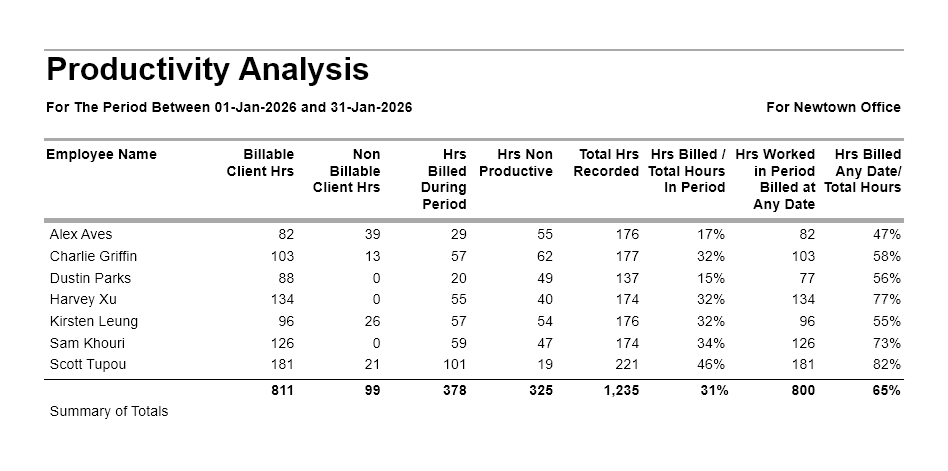
Productivity Analysis report
This report is useful for understanding the relationship between time recorded and time billed. It helps answer questions such as whether productive hours are being invoiced, how much recorded work has been recovered, and whether there are delays between employees completing work and that work being billed.
Go to Reports > Management Analysis > and choose Productivity Analysis report.
Select the required date range for time recorded by employees within the selected period.
Productivity Analysis Report – Filter, Sorting and Grouping Options
You can also optionally filter this report by Employee Office.
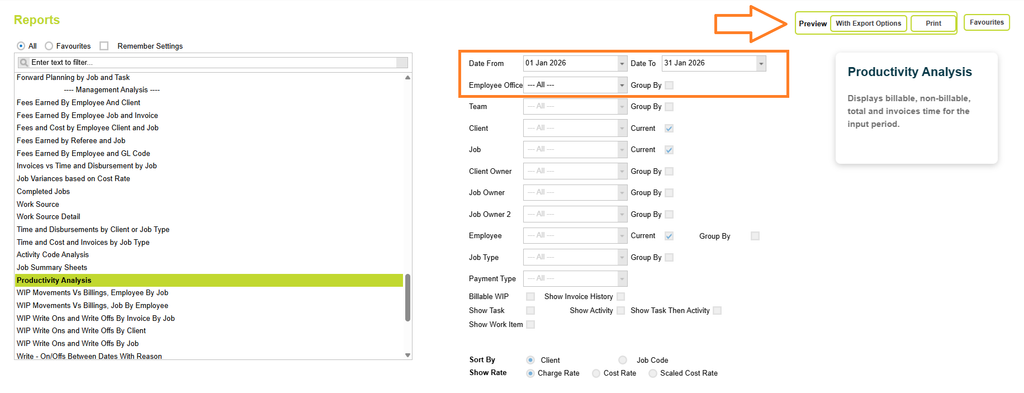
Now click on the Preview button and select one of the preview options (Print or with Export options).
Understanding the data
The list shows productivity and billing information for each employee during the selected reporting period. The report compares recorded time, billed time and the proportion of recorded work that was ultimately billed.
Columns include:
- Employee Name
- Billable Client Hours
- Non Billable Client Hours
- Hours Billed During Period
- Hours Non Productive
- Total Hours Recorded
- Hours Billed/Total Hours in Period
- Hours Worked in Period Billed at Any date
- Hours Billed Any Date/Total Hours
At the end of the report, totals are provided for all Employees.
Date
The Productivity Analysis Report is based on timesheet line dates.
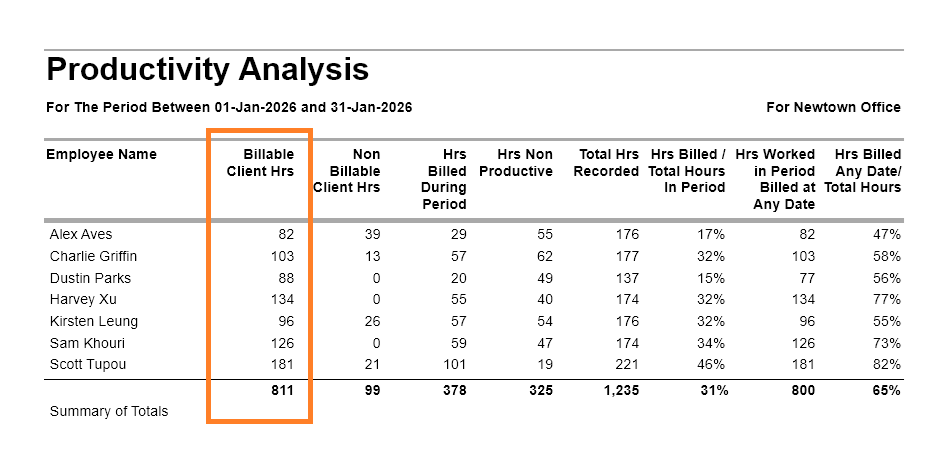
Billable Client Hours
The total number of chargeable hours (billable client hours) recorded by the employee during the selected reporting period.
These are hours entered against projects that are marked as billable, where the client is also billable. This figure will reconcile to the total chargeable hours in the Employee Productivity report and other hours worked reports.
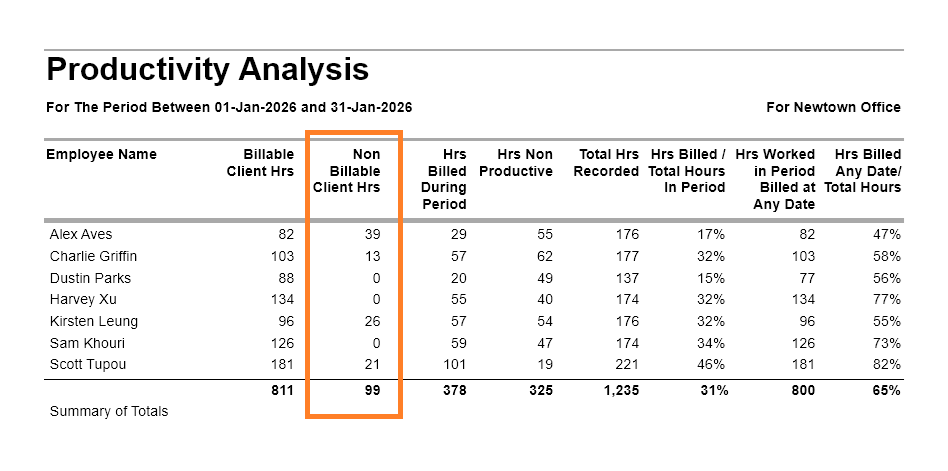
Non Billable Client Hours
Non-chargeable hours recorded during the reporting period against jobs that belong to a billable client. These hours are entered against projects marked as not billable, but where the client itself is marked as billable.
These typically include:
- Proposal Projects
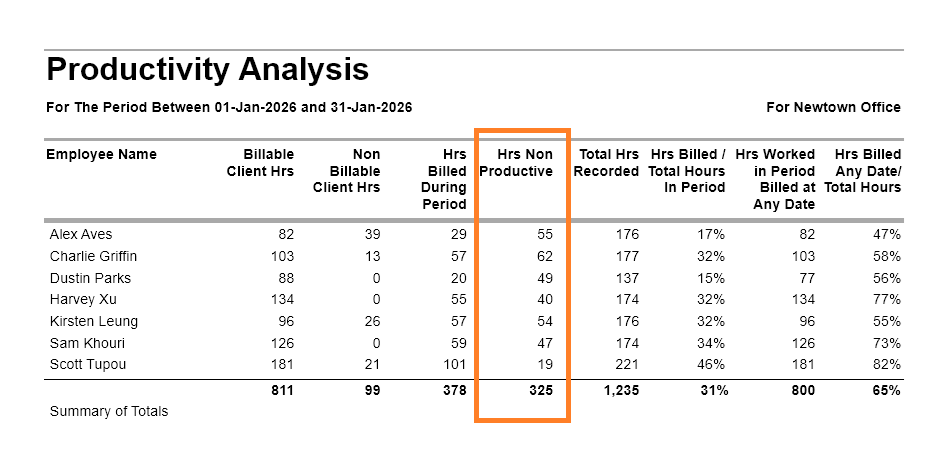
Hours Non Productive
The total number of non-chargeable hours recorded by the employee during the reporting period against jobs that belong to a non-billable client (typically overhead or internal projects). These hours are entered against projects marked as not billable, where the client is also classified as not billable.
These typically include:
- Internal administration
- Meetings
- Training
- Proposal work
- Leave or other non-billable activities
Total Hours Recorded
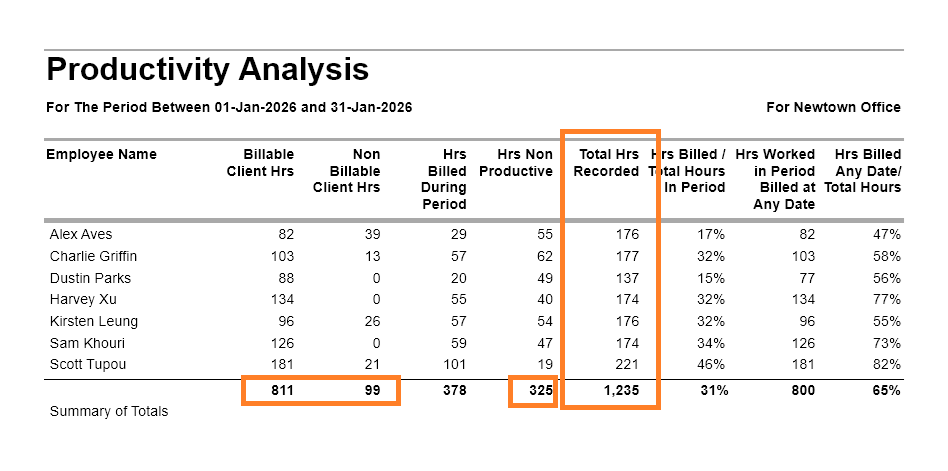
The total number of hours recorded by the employee during the reporting period.
This includes billable client hours, non-billable client hours and non-productive time.
Hours Billed During Period
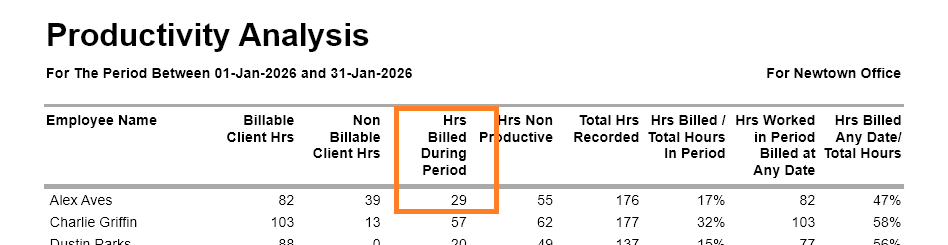
The total number of timesheet hours worked during the reporting period that have been billed, written off, or assigned to an invoice (including zero-value invoice lines). To be included, both the timesheet date and the WIP Assigned date must fall within the reporting period. The invoice date itself does not determine whether the hours are included.
Example: For a report covering 1 January to 31 January, hours worked in January and assigned to WIP in January will be included, even if the invoice is not issued until February. Conversely, hours worked in December or assigned to WIP in February will not be included, regardless of the invoice date.
| Timesheet Date | Invoice Date | WIP Assigned Date | Included? |
|---|---|---|---|
| 20 Dec | 15 Jan | 15 Jan | No |
| 15 Jan | 20 Jan | 5 Feb | No |
| 15 Jan | 01 Feb | 28 Jan | Yes |
| 15 Jan | 20 Jan | 25 Jan | Yes |
Read more about the WIP Assigned Date rules here
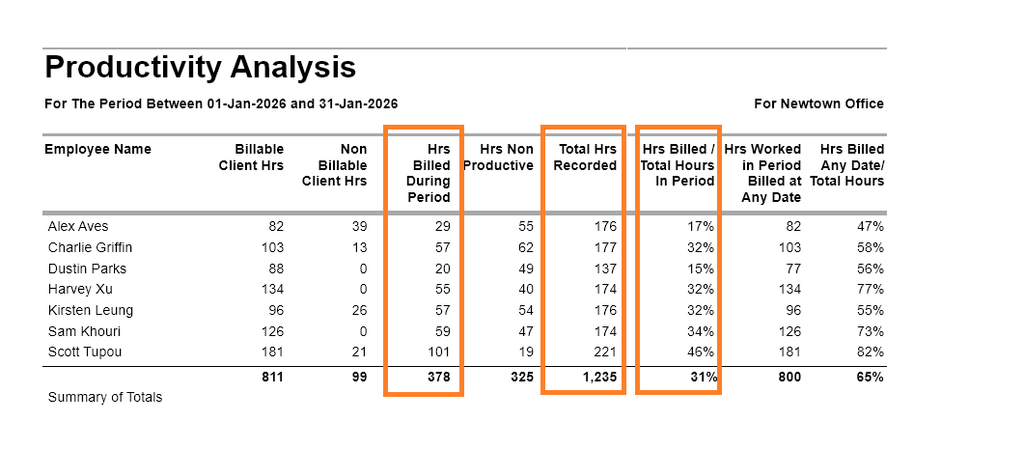
In the example below, Alex has 29 Hours Billed During Period.
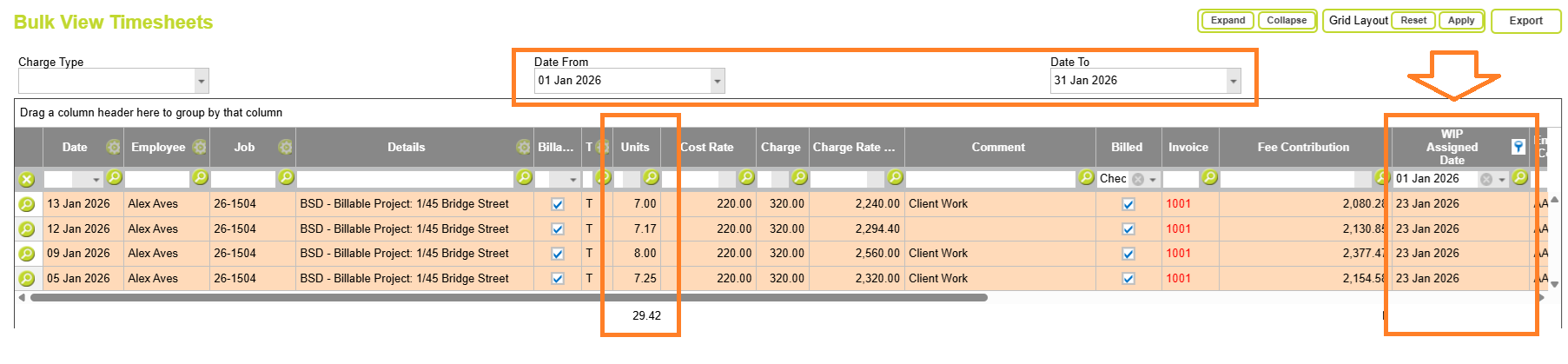
You can confirm this value using the Bulk View Timesheets report by filtering the timesheet Date and WIP Assigned Date to the same reporting period (1 Jan 2026 to 31 Jan 2026). The resulting total represents the hours worked during the period that were assigned to WIP during the same period and therefore contribute to the Hours Billed During Period value.
Hrs Billed / Total Hours In Period
This percentage compares the Hours Billed During Period with the Hours Worked during the reporting period.
It provides an indication of how much recorded work was billed during the selected period. A higher percentage generally indicates that work is being billed soon after it is performed, while a lower percentage may indicate delays between completing work and billing it.
Hrs Worked In Period Billed At Any Date
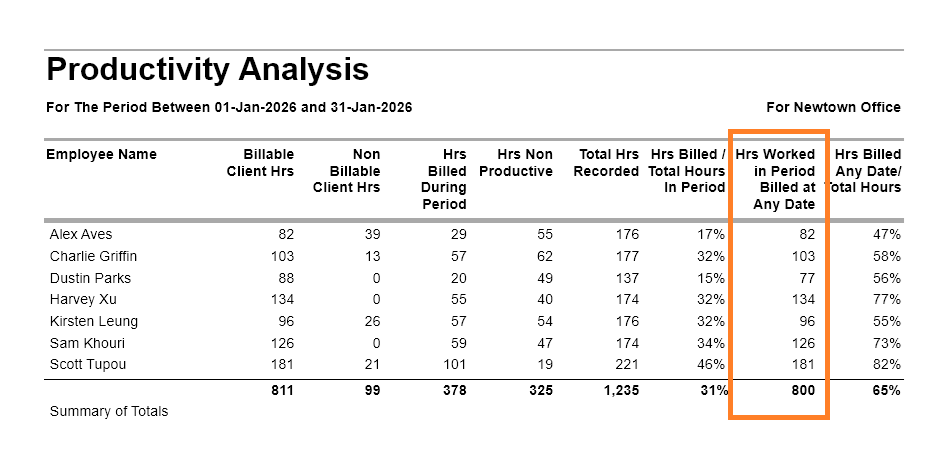
The total number of hours recorded during the reporting period that have subsequently been billed, regardless of when the invoice was raised or the WIP was assigned. This measure looks at hours worked within the selected date range and determines whether those hours have been billed by the time the report is run.
As time passes, this figure will typically move closer to the Billable Client Hours total for the same period, as work is invoiced, written off, or otherwise resolved. A significant gap between the two may indicate that billable work remains in WIP and has not yet progressed through the firm’s billing process, or been resolved in another manner.
Hrs Worked In Period Billed At Any Date / Total Hours
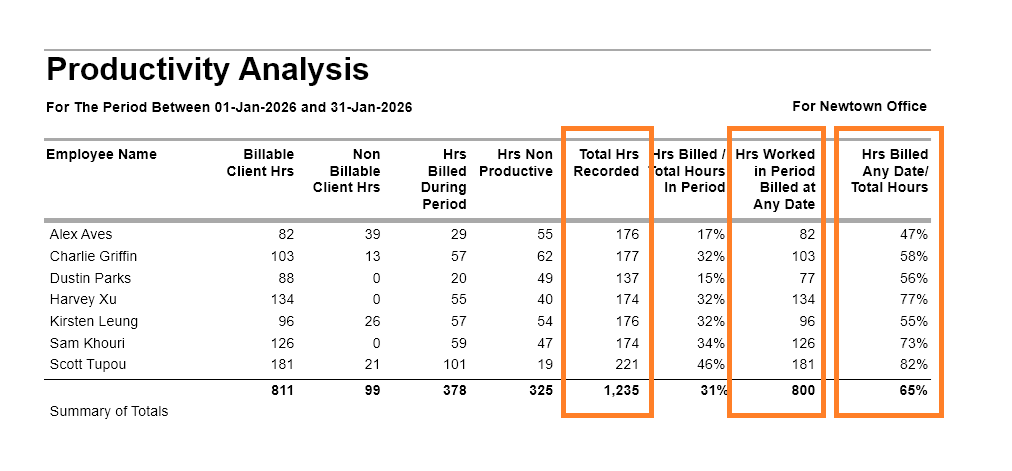
This percentage compares the total hours eventually billed against the total hours worked during the selected reporting period. It provides a longer-term view of billing recovery than Hrs Billed / Total Hours In Period, as it allows for delays between completing work and invoicing the client.
As time passes and more work is invoiced or written off, this percentage will typically increase. For this reason, it can provide a fairer measure of billing recovery when reviewing historical performance, as it is less affected by invoice timing and billing cycles than measures based solely on invoices raised during the reporting period.
For example, work completed in January may not be invoiced until February or March. While this delay would reduce the Hrs Billed / Total Hours In Period percentage for January, it will not affect this measure once those hours are ultimately billed. As a result, Hrs Worked In Period Billed At Any Date / Total Hours provides a more complete view of the proportion of recorded time that was ultimately recovered through the billing process.
Abtrac KB# 2272