
In Abtrac, any client can be flagged as a Master Client. A Master Client acts as a parent company and can be linked to one or more subsidiary clients.
This is useful where multiple companies operate under a single group, brand, or holding company, but still need to be managed separately in day-to-day operations.
Only clients flagged as Master Clients can be selected as a parent
Subsidiary clients remain independent but are linked to the Master Client for search and reporting purposes
Why use Master Clients in Abtrac?
Using a Master Client allows you to group related clients together for high-level visibility—such as searching, reporting, and revenue analysis—while keeping each subsidiary client set up independently within Abtrac.
They allow you to:
- Keep invoicing, projects, and time tracking accurate at a subsidiary level
- Group related clients together for easier searching
- Report on revenue and performance across an entire client group
In practice, many businesses choose this approach because subsidiary companies often need to remain separate for operational, commercial, or legal reasons. For example, you may want to:
- Invoice separately, where each subsidiary is its own legal entity with distinct GST registrations, billing terms, or invoice branding
- Manage projects independently, with different project managers, workflows, or contract structures per company
- Track time and costs accurately against the correct entity, especially where staff work across multiple related companies
- Maintain legal and contractual separation, ensuring agreements, work history, and financial records sit with the correct client entity
- Apply different budgets, write-up/down rules, or reporting settings at a client level, while still rolling results up to a group level for analysis
By keeping subsidiary clients independent but linked to a Master Client, Abtrac gives you the flexibility to manage each company correctly, without losing the ability to view performance and invoicing at a consolidated, group-wide level when required.
Setting a Client as a Master Client
Go to Search Clients and Projects > and open the client you want to use as the parent company.
From the Client Details page> tick the Master Client checkbox
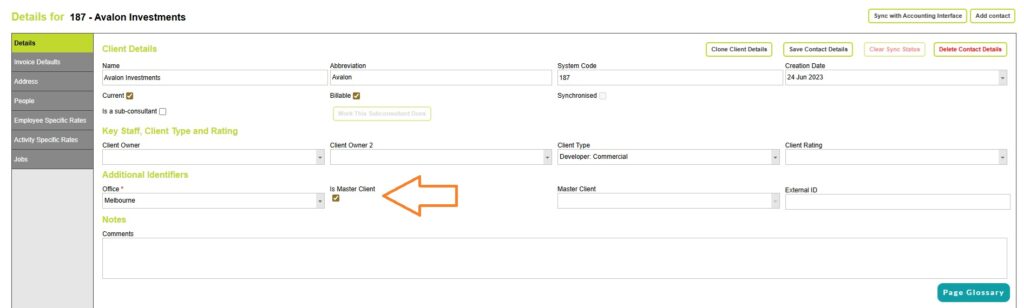
Save the client changes.
Once saved, this client will be available to assign as a Master Client for other clients.
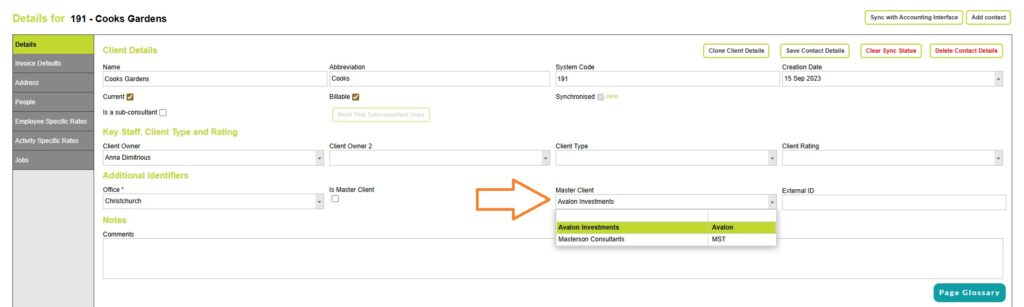
Assigning a Master Client to a Subsidiary Client
Go to Search Clients and Projects > and open the client that belongs to a parent company.
In the Master Client drop down box, select the parent company name. (Only clients flagged as Master Clients will appear in this list)
The subsidiary client is now linked to the Master Client.
Reporting on Master Clients (Parent Companies)
Search Clients and Jobs: View all Jobs associated with a Master Client
You can view and export a list of all jobs and clients associated with a Master Client from the Clients and Jobs Search screen. From the Home page go to > Search Clients and Jobs.
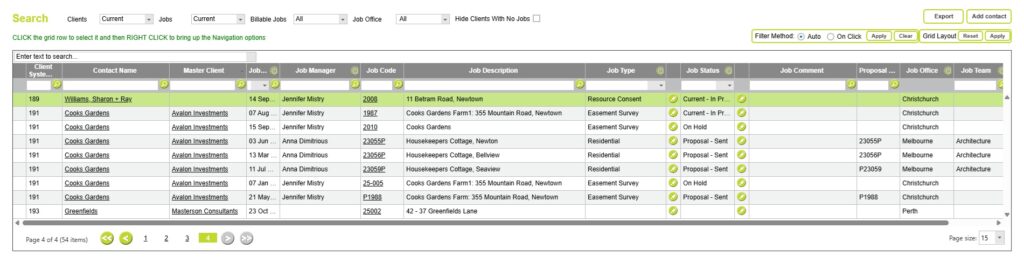
See which clients belong to the same parent company
Use the Master Client filter options to see all subsidiary projects for a Master Client.
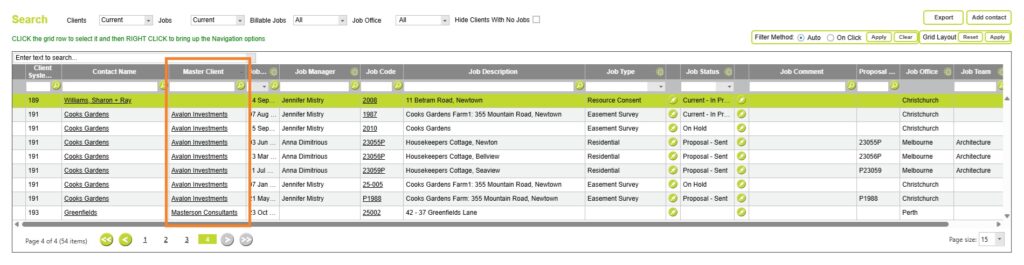
View all jobs belonging to both the Master Client and the Subsidiary Clients.
Or use the wild search toption to see all projects, including those that belong to the Master Client itself.
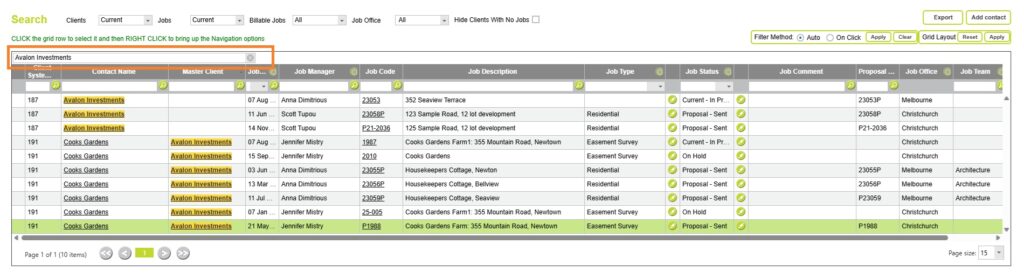
To see Master Clients on the Clients and Jobs Search screen.
You may need to enable the column for Master Client on the Clients and Jobs search screen. From Administration >> Settings >> User Control Settings you can control the column widths and required fields in many of the common data entry screens.
Choose the Contacts and Jobs page, and set a width for the Master Client field. Save your changes.
You can read more about User Control Settings here
Top Clients Report: View all revenue associated with a Master Client
The Top Clients report includes an option to display invoice totals grouped by Master Client, rather than by individual clients
This allows you to see total revenue by parent company.
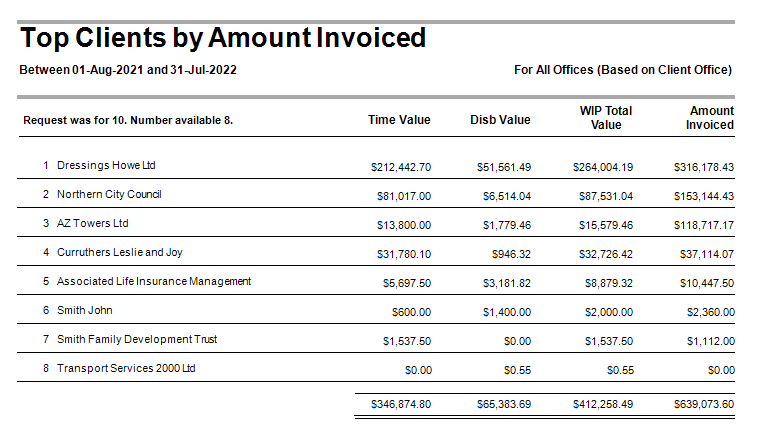
Read more about the Top Clients report here
When you wouldn’t use the Master Client option
The Master Client option is designed for true parent–subsidiary client relationships. There are several common scenarios where it’s not the right tool and may add unnecessary complexity.
Single client with different billing requirements
You generally wouldn’t use a Master Client when you are working with a single client, but one or more projects need to be invoiced differently, and there is no parent company structure involved.
This includes situations where:
- Projects need to be invoiced to different addresses or departments
- Purchase orders or invoice references vary by project
- The legal client remains the same entity
In these cases, the client should remain as a single client record, with billing handled at a project or invoice level rather than by introducing a Master Client.
Split invoice scenarios
You also wouldn’t use a Master Client where a single job belongs to one client, but the invoicing is split.
Common examples include:
- A job where part of the work is invoiced to the client and part to another party
- Progress claims or variations that are billed to different recipients
- Shared projects where costs are apportioned across multiple invoices
In these scenarios, the job itself still belongs to one client. The difference lies only in how the invoices are issued, not in the client structure. Using a Master Client here would incorrectly imply a parent–subsidiary relationship.
Abtrac provides other ways to manage split invoicing without changing the client hierarchy.
Invoicing a third party (e.g. Architect, Consultant, or Developer)
Another common case is where:
- Most jobs are invoiced to the client, but
- One or more jobs (or parts of a job) are invoiced directly to a third party, such as an architect, consultant, or developer
Even though the invoice recipient changes, this does not mean the client should be treated as a subsidiary of the third party. The work is still being performed for the original client, and the billing arrangement is project or invoice-specific.
In these cases:
- Keep the original client as the job client
- Use Abtrac’s project or invoice-level billing options to direct invoices appropriately
- Avoid creating Master Clients unless there is a genuine company group relationship
Abtrac KB # 2235